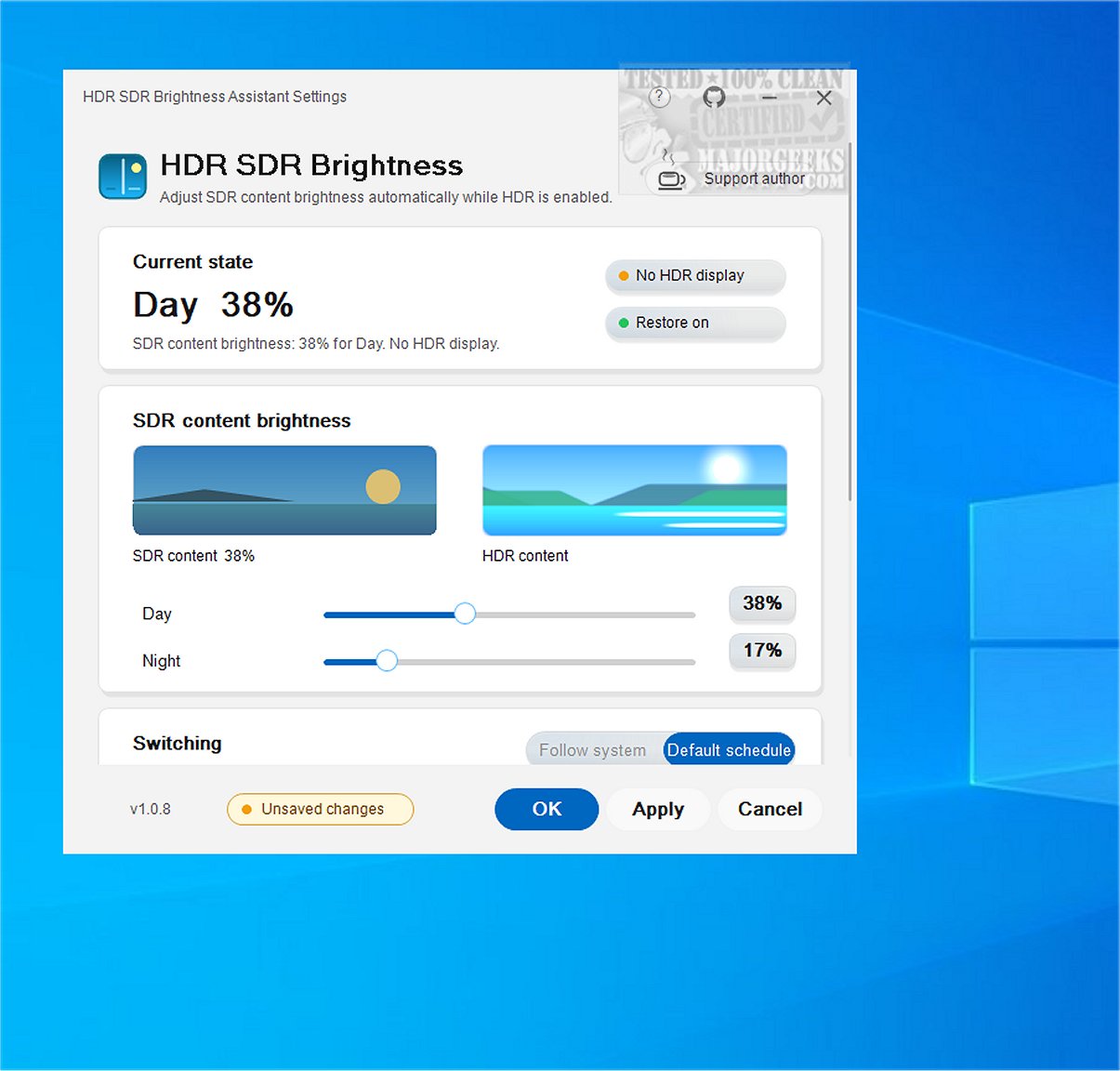
HDR SDR Brightness is a newly released lightweight application that operates from the Windows system tray. Its primary purpose is to ensure consistent brightness levels for Standard Dynamic Range (SDR) content while High Dynamic Range (HDR) is active in Windows. This tool significantly enhances the viewing experience by managing brightness adjustments effectively, particularly for users with OLED, QD-OLED, and MiniLED displays, as well as HDR-compatible monitors, TVs, and laptops.
Key Features:
- Targeted Display Support: The application is specifically optimized for advanced display technologies, addressing common issues faced when displaying SDR content under HDR settings, such as excessive brightness, dim displays, and loss of color vibrancy.
- Windows Night Light Synchronization: Users can set unique brightness levels for SDR content depending on the time of day. HDR SDR Brightness can synchronize with Windows Night Light settings, automatically adjusting brightness based on user preferences and manual changes.
- System Tray Functionality: Operating discreetly from the system tray, the app allows for easy startup without cluttering the desktop. It also adapts to the Windows light or dark theme, contributing to a seamless user experience. A live preview feature within the settings window enables users to make real-time adjustments to SDR and HDR settings.
- Affordable Access: Available on the Microsoft Store, HDR SDR Brightness includes a paid app version with a limited-time free trial. The application is designed to be straightforward with no in-app purchases, subscriptions, or hidden costs. It does not require additional drivers or software installations, with all settings stored locally for the current user.
Extended Insights:
The introduction of HDR SDR Brightness 1.1.3 is particularly timely as more users transition to HDR content in their media consumption. The tool not only serves as a practical solution for brightness inconsistencies but also reflects a growing demand for customizable viewing experiences in an era where display technology continues to evolve rapidly.
Moreover, its compatibility with various display types highlights a commitment to catering to diverse user needs. As HDR becomes more prevalent in gaming, streaming, and other multimedia applications, tools like HDR SDR Brightness will play a crucial role in enhancing user satisfaction and comfort.
In conclusion, HDR SDR Brightness stands out as a valuable utility for Windows users looking to optimize their visual experiences while navigating the complexities of HDR and SDR content. Its lightweight design and user-friendly features make it a worthy addition to any multimedia setup
Key Features:
- Targeted Display Support: The application is specifically optimized for advanced display technologies, addressing common issues faced when displaying SDR content under HDR settings, such as excessive brightness, dim displays, and loss of color vibrancy.
- Windows Night Light Synchronization: Users can set unique brightness levels for SDR content depending on the time of day. HDR SDR Brightness can synchronize with Windows Night Light settings, automatically adjusting brightness based on user preferences and manual changes.
- System Tray Functionality: Operating discreetly from the system tray, the app allows for easy startup without cluttering the desktop. It also adapts to the Windows light or dark theme, contributing to a seamless user experience. A live preview feature within the settings window enables users to make real-time adjustments to SDR and HDR settings.
- Affordable Access: Available on the Microsoft Store, HDR SDR Brightness includes a paid app version with a limited-time free trial. The application is designed to be straightforward with no in-app purchases, subscriptions, or hidden costs. It does not require additional drivers or software installations, with all settings stored locally for the current user.
Extended Insights:
The introduction of HDR SDR Brightness 1.1.3 is particularly timely as more users transition to HDR content in their media consumption. The tool not only serves as a practical solution for brightness inconsistencies but also reflects a growing demand for customizable viewing experiences in an era where display technology continues to evolve rapidly.
Moreover, its compatibility with various display types highlights a commitment to catering to diverse user needs. As HDR becomes more prevalent in gaming, streaming, and other multimedia applications, tools like HDR SDR Brightness will play a crucial role in enhancing user satisfaction and comfort.
In conclusion, HDR SDR Brightness stands out as a valuable utility for Windows users looking to optimize their visual experiences while navigating the complexities of HDR and SDR content. Its lightweight design and user-friendly features make it a worthy addition to any multimedia setup
HDR SDR Brightness 1.1.3 released
HDR SDR Brightness is a lightweight tool that resides in the Windows system tray. It is designed to help you maintain consistent brightness levels for SDR (Standard Dynamic Range) content when HDR (High Dynamic Range) is enabled in Windows. This tool ensures a more predictable viewing experience by effectively managing brightness adjustments.