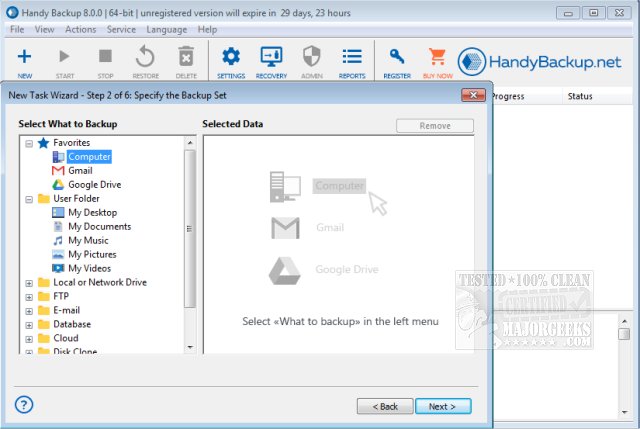
Handy Backup 8.7.3 has been released as a comprehensive automatic backup solution for users' operating systems. This software is capable of performing full, incremental, and differential backups, as well as synchronizing folders either locally or through LAN and FTP connections. It comes equipped with presets for backing up various types of data, including Outlook (up to 2007) and Windows Mail, instant messaging data, emails, Windows registry, as well as user folders like My Documents, Favorites, and Desktop.
The software supports a wide array of storage media, allowing backups to be stored on CD-R/-RW, DVD, Blu-ray, HD DVD, USB drives, Flash, FireWire, FTP, SFTP, LAN networks, hard drives, and online storage. Handy Backup can also be enhanced with advanced plug-ins that provide additional features such as backing up SFTP servers, hot backup and recovery for Microsoft Exchange Server data, MS SQL Server and Oracle database backups, and compatibility with ODBC-compliant databases like MySQL.
One of its standout features is the Disk Image function, which allows users to create a complete hard disk image backup, essentially capturing a snapshot of all data on a PC. Handy Backup offers multiple backup options, including on-the-fly ZIP64 compression, 128-bit Blowfish encryption, and the ability to run other programs before and after backup tasks. The user-friendly, wizard-based interface simplifies the task of setting up backups, while its flexible scheduling and administration capabilities allow it to function as a Windows service, support a command-line interface, and send email notifications.
Key features of Handy Backup include:
- Selective data backup with file mask filtering.
- Free plug-ins for easier backups of specific data types like My Documents and Outlook.
- Extensive support for various storage media.
- Advanced backup options such as compression and encryption.
- Flexible scheduling for regular backup tasks.
- The ability to run as a Windows service for seamless operation without user intervention.
In addition to its impressive backup capabilities, Handy Backup is particularly useful for users looking to maintain the security and integrity of their data. With ongoing updates and support, users can rely on Handy Backup to keep their important files safe and easily recoverable in the event of data loss or system failure.
Overall, Handy Backup 8.7.3 stands out as a robust solution for both casual users and IT professionals, enhancing data protection strategies while offering user-friendly features that streamline the backup process
The software supports a wide array of storage media, allowing backups to be stored on CD-R/-RW, DVD, Blu-ray, HD DVD, USB drives, Flash, FireWire, FTP, SFTP, LAN networks, hard drives, and online storage. Handy Backup can also be enhanced with advanced plug-ins that provide additional features such as backing up SFTP servers, hot backup and recovery for Microsoft Exchange Server data, MS SQL Server and Oracle database backups, and compatibility with ODBC-compliant databases like MySQL.
One of its standout features is the Disk Image function, which allows users to create a complete hard disk image backup, essentially capturing a snapshot of all data on a PC. Handy Backup offers multiple backup options, including on-the-fly ZIP64 compression, 128-bit Blowfish encryption, and the ability to run other programs before and after backup tasks. The user-friendly, wizard-based interface simplifies the task of setting up backups, while its flexible scheduling and administration capabilities allow it to function as a Windows service, support a command-line interface, and send email notifications.
Key features of Handy Backup include:
- Selective data backup with file mask filtering.
- Free plug-ins for easier backups of specific data types like My Documents and Outlook.
- Extensive support for various storage media.
- Advanced backup options such as compression and encryption.
- Flexible scheduling for regular backup tasks.
- The ability to run as a Windows service for seamless operation without user intervention.
In addition to its impressive backup capabilities, Handy Backup is particularly useful for users looking to maintain the security and integrity of their data. With ongoing updates and support, users can rely on Handy Backup to keep their important files safe and easily recoverable in the event of data loss or system failure.
Overall, Handy Backup 8.7.3 stands out as a robust solution for both casual users and IT professionals, enhancing data protection strategies while offering user-friendly features that streamline the backup process
Handy Backup 8.7.3 released
Handy Backup is a complete automatic backup solution for your operating system.