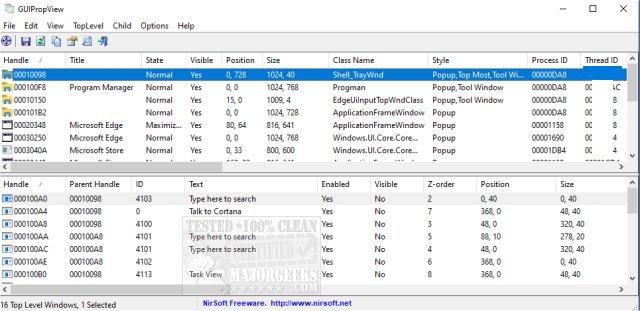
The latest version of GUIPropView, 1.34, has been released, providing users with an extensive overview of all currently open windows on their operating system. This tool features a dual-pane interface: the upper pane displays a list of all top-level windows, while the lower pane reveals the child windows associated with the selected top-level window. Designed as a modern alternative to Nirsoft's WinLister, GUIPropView offers enhanced functionality for managing your windows.
Users have the ability to select multiple windows and perform a variety of actions, such as closing, hiding, showing, minimizing, maximizing, enabling, or disabling them. By default, GUIPropView does not show invisible top-level windows; however, users can easily access these by enabling the 'Display Hidden Windows' and 'Display Windows With (0, 0) Size' options found in the TopLevel menu.
In addition to its core features, GUIPropView can be a valuable resource for those looking to manage their Windows environment more effectively. Related topics that users may find useful include how to restore or verify default services in Windows 7, 8, 10, and 11, identifying processes or services on a computer, saving a text file of all running processes with TaskList, adding services to the Control Panel, and customizing process information in Task Manager.
This release of GUIPropView not only enhances window management but also aligns with ongoing efforts to improve user experience and productivity on Windows systems. As software continues to evolve, tools like GUIPropView remain crucial for users looking to optimize their workflow and maintain a clutter-free workspace
Users have the ability to select multiple windows and perform a variety of actions, such as closing, hiding, showing, minimizing, maximizing, enabling, or disabling them. By default, GUIPropView does not show invisible top-level windows; however, users can easily access these by enabling the 'Display Hidden Windows' and 'Display Windows With (0, 0) Size' options found in the TopLevel menu.
In addition to its core features, GUIPropView can be a valuable resource for those looking to manage their Windows environment more effectively. Related topics that users may find useful include how to restore or verify default services in Windows 7, 8, 10, and 11, identifying processes or services on a computer, saving a text file of all running processes with TaskList, adding services to the Control Panel, and customizing process information in Task Manager.
This release of GUIPropView not only enhances window management but also aligns with ongoing efforts to improve user experience and productivity on Windows systems. As software continues to evolve, tools like GUIPropView remain crucial for users looking to optimize their workflow and maintain a clutter-free workspace
GUIPropView 1.34 released
GUIPropView provides you with a detailed list of all windows currently opened on your system.