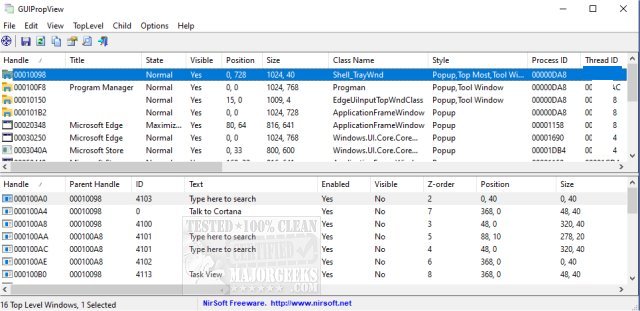
GUIPropView has recently released version 1.33, offering users a comprehensive tool for viewing all currently open windows on their system. The application features a dual-pane layout, where the top pane displays all top-level windows and the bottom pane lists the child windows linked to the selected top-level window. This tool serves as a modern alternative to Nirsoft's WinLister app.
With GUIPropView, users can select multiple windows and perform various actions including closing, hiding, showing, minimizing, maximizing, enabling, and disabling them. By default, it does not show invisible top-level windows, but users can choose to view them by activating the 'Display Hidden Windows' and 'Display Windows With (0, 0) Size' options from the TopLevel menu.
In addition to its primary functionalities, GUIPropView may assist users in managing their system more effectively. It complements other tools and guides available for Windows, such as methods for restoring default services, identifying processes and services, saving process information, and customizing the Task Manager view.
As technology continues to evolve, GUIPropView could incorporate additional features such as enhanced search capabilities, user-defined filters for window types, and support for managing windows across multiple monitors. These enhancements would further streamline the window management process for users, making GUIPropView an indispensable utility for optimizing productivity and organization on their systems
With GUIPropView, users can select multiple windows and perform various actions including closing, hiding, showing, minimizing, maximizing, enabling, and disabling them. By default, it does not show invisible top-level windows, but users can choose to view them by activating the 'Display Hidden Windows' and 'Display Windows With (0, 0) Size' options from the TopLevel menu.
In addition to its primary functionalities, GUIPropView may assist users in managing their system more effectively. It complements other tools and guides available for Windows, such as methods for restoring default services, identifying processes and services, saving process information, and customizing the Task Manager view.
As technology continues to evolve, GUIPropView could incorporate additional features such as enhanced search capabilities, user-defined filters for window types, and support for managing windows across multiple monitors. These enhancements would further streamline the window management process for users, making GUIPropView an indispensable utility for optimizing productivity and organization on their systems
GUIPropView 1.33 released
GUIPropView provides you with a detailed list of all windows currently opened on your system.