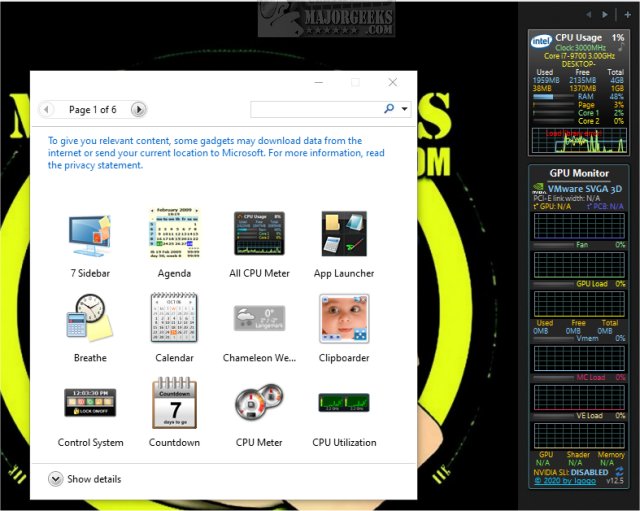
The recent release of GPU Monitor 13.9 is a notable update for users looking to monitor their NVIDIA or Radeon graphics cards on Windows. This gadget provides detailed insights into various performance metrics, including GPU status, fan speed, GPU load, virtual memory, memory controller load, video engine load, and SLI status.
It's essential to highlight that Windows previously removed gadgets due to security concerns, so users wishing to utilize GPU Monitor will need to install additional software like 8GadgetPack or Desktop Gadgets Revived to enable gadget functionality. These third-party tools ensure a safer experience by offering a selection of tested and reliable gadgets, although caution is advised when adding any beyond the default options.
Once installed, GPU Monitor is designed to be lightweight, consuming only about 5% of CPU resources and 50MB of memory, making it unlikely to disrupt regular computer usage. To get started, users can simply double-click the GPUMonitor.gadget file if they have the necessary gadget functionality enabled, but in most cases, the installation of a third-party tool will be required.
In addition to its primary function, GPU Monitor can be a useful companion for gamers and professionals alike who want to keep an eye on their system's graphical performance in real-time. For those interested in optimizing their hardware further, the text also references various related topics, such as downloading the latest drivers for Windows and managing NVIDIA Control Panel settings.
In conclusion, GPU Monitor 13.9 presents a valuable tool for monitoring graphics card performance on Windows, especially for those who take the necessary precautions when using gadgets. As technology progresses, the importance of monitoring system performance continues to grow, making tools like GPU Monitor increasingly relevant for maintaining optimal computing experiences
It's essential to highlight that Windows previously removed gadgets due to security concerns, so users wishing to utilize GPU Monitor will need to install additional software like 8GadgetPack or Desktop Gadgets Revived to enable gadget functionality. These third-party tools ensure a safer experience by offering a selection of tested and reliable gadgets, although caution is advised when adding any beyond the default options.
Once installed, GPU Monitor is designed to be lightweight, consuming only about 5% of CPU resources and 50MB of memory, making it unlikely to disrupt regular computer usage. To get started, users can simply double-click the GPUMonitor.gadget file if they have the necessary gadget functionality enabled, but in most cases, the installation of a third-party tool will be required.
In addition to its primary function, GPU Monitor can be a useful companion for gamers and professionals alike who want to keep an eye on their system's graphical performance in real-time. For those interested in optimizing their hardware further, the text also references various related topics, such as downloading the latest drivers for Windows and managing NVIDIA Control Panel settings.
In conclusion, GPU Monitor 13.9 presents a valuable tool for monitoring graphics card performance on Windows, especially for those who take the necessary precautions when using gadgets. As technology progresses, the importance of monitoring system performance continues to grow, making tools like GPU Monitor increasingly relevant for maintaining optimal computing experiences
GPU Monitor 13.9 released
GPU Monitor is a Windows gadget that monitors your NVIDIA or Radeon graphics cards.