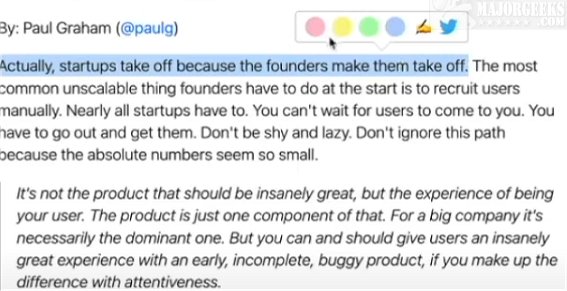
The Glasp for Chrome extension has been updated to version 2.0.0, enhancing the way users can interact with web content. This tool is designed for writers, readers, and thinkers, allowing them to easily take notes and highlight significant information on web pages. Users can save and discover interesting articles shared by their friends, making it easier to engage with relevant content.
With Glasp, highlights can be made in various colors and are automatically organized on the user's homepage. Features include tagging, searching, and the ability to link and share highlights across popular platforms like Twitter, Teams, and Slack. The extension utilizes ChatGPT technology to summarize YouTube videos and web articles, providing users with quick insights into content of interest.
The sidebar displays all highlights and notes, allowing users to navigate directly to the highlighted sections of a webpage. Additionally, users can tag web pages and view highlights from other users, fostering a community of shared knowledge. All saved content is accessible from any device with a single click, ensuring that highlights remain intact and organized.
Key features of Glasp for Chrome include:
- Highlighting text on web pages and annotating YouTube videos
- AI-generated summaries based on user annotations
- Highlighting and annotating PDF files
- Creating notes related to highlights
- Tagging and linking highlights for easy retrieval
- Copying and pasting highlights and notes, including metadata, into note-taking apps with one click
- Discovering useful content curated by others
- Synchronizing highlights and notes from Kindle eBooks
To utilize Glasp for Chrome, users must create an account. The extension not only streamlines the process of managing online content but also connects users to a broader community, enhancing their knowledge and understanding through shared insights.
In future updates, Glasp could consider integrating features such as collaborative note-taking, enhanced search functions for specific topics, or even the ability to create personalized reading lists based on user interests. Additionally, incorporating more social features could foster greater interaction among users, enabling them to discuss and collaborate on highlighted materials more effectively
With Glasp, highlights can be made in various colors and are automatically organized on the user's homepage. Features include tagging, searching, and the ability to link and share highlights across popular platforms like Twitter, Teams, and Slack. The extension utilizes ChatGPT technology to summarize YouTube videos and web articles, providing users with quick insights into content of interest.
The sidebar displays all highlights and notes, allowing users to navigate directly to the highlighted sections of a webpage. Additionally, users can tag web pages and view highlights from other users, fostering a community of shared knowledge. All saved content is accessible from any device with a single click, ensuring that highlights remain intact and organized.
Key features of Glasp for Chrome include:
- Highlighting text on web pages and annotating YouTube videos
- AI-generated summaries based on user annotations
- Highlighting and annotating PDF files
- Creating notes related to highlights
- Tagging and linking highlights for easy retrieval
- Copying and pasting highlights and notes, including metadata, into note-taking apps with one click
- Discovering useful content curated by others
- Synchronizing highlights and notes from Kindle eBooks
To utilize Glasp for Chrome, users must create an account. The extension not only streamlines the process of managing online content but also connects users to a broader community, enhancing their knowledge and understanding through shared insights.
In future updates, Glasp could consider integrating features such as collaborative note-taking, enhanced search functions for specific topics, or even the ability to create personalized reading lists based on user interests. Additionally, incorporating more social features could foster greater interaction among users, enabling them to discuss and collaborate on highlighted materials more effectively
Glasp for Chrome 2.0.0 released
With the Glasp for Chrome extension, you can easily jot down notes and highlight important information on web pages.