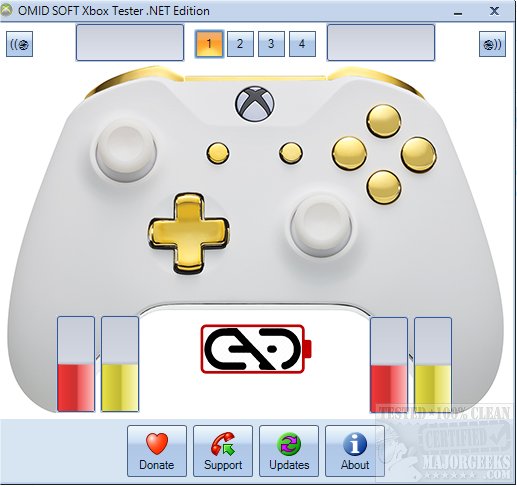
The Gamepad Tester .NET Edition 19.10 has been released, providing users with a portable application designed to assess the functionality of Xbox controllers. This tool enables users to test various components of their controllers, including buttons, triggers, thumbsticks, and vibration motors, to identify any potential issues that might affect gameplay performance. The application is user-friendly: simply launch it and start testing the different buttons to check for any malfunctions.
In addition to its testing capabilities, Gamepad Tester offers a straightforward interface that ensures users can quickly navigate through the testing process. This is particularly useful for gamers who want to ensure their controllers are in optimal working condition before diving into their gaming sessions.
For those interested in enhancing their gaming experience further, there are also guides available on related topics, such as uninstalling the Xbox Game Bar and Xbox Console Companion, as well as managing Game Mode settings in Windows 10 and 11. These resources can help users fine-tune their gaming environment and resolve any software-related issues that may arise.
Moving forward, it would be beneficial for developers to consider incorporating additional features into Gamepad Tester, such as compatibility checks for various controller models, detailed reporting of detected issues, and suggestions for potential fixes. Furthermore, expanding support to include other gaming platforms beyond Xbox could broaden the app's appeal and utility for a wider audience of gamers
In addition to its testing capabilities, Gamepad Tester offers a straightforward interface that ensures users can quickly navigate through the testing process. This is particularly useful for gamers who want to ensure their controllers are in optimal working condition before diving into their gaming sessions.
For those interested in enhancing their gaming experience further, there are also guides available on related topics, such as uninstalling the Xbox Game Bar and Xbox Console Companion, as well as managing Game Mode settings in Windows 10 and 11. These resources can help users fine-tune their gaming environment and resolve any software-related issues that may arise.
Moving forward, it would be beneficial for developers to consider incorporating additional features into Gamepad Tester, such as compatibility checks for various controller models, detailed reporting of detected issues, and suggestions for potential fixes. Furthermore, expanding support to include other gaming platforms beyond Xbox could broaden the app's appeal and utility for a wider audience of gamers
Gamepad Tester .NET Edition 19.10 released
Gamepad Tester is a portable app that allows you to test your Xbox controller's buttons, triggers, thumbsticks, and vibration motors for issues.