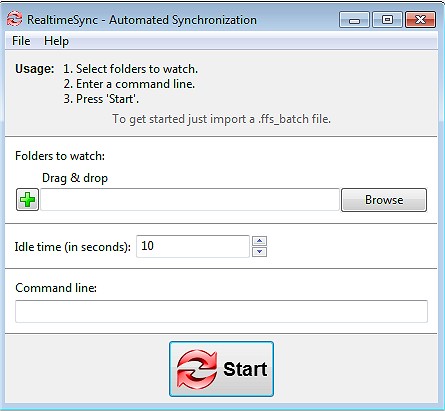
FreeFileSync 14.13 has been released, enhancing its capabilities as a file and folder comparison and synchronization tool. Designed to simplify the backup and syncing process, FreeFileSync is an open-source utility that facilitates quick and efficient file management without the clutter of bloatware or ads. Whether you're looking to maintain identical folders across various devices, safeguard critical data, or handle extensive file transfers, FreeFileSync proves to be an invaluable asset.
Key Features of FreeFileSync:
- Fast & Smart Syncing: The software intelligently compares files by size, date, and content, ensuring precise synchronization.
- Real-Time Syncing: Automatically updates files as changes occur, providing continuous data protection.
- Flexible Sync Options: Users can choose from mirror, two-way, and custom sync methods to manage data effectively.
- Batch Jobs & Automation: Schedule sync tasks for hands-free operation.
- Cross-Platform Compatibility: FreeFileSync runs on Windows, macOS, and Linux.
- Versioning & Conflict Detection: Keeps previous versions of files to prevent accidental loss.
- No Ads or Bloat: Offers a straightforward and powerful file synchronization experience.
Who Can Benefit:
- Everyday Users: Easily back up personal files, documents, and photos.
- Professionals & Businesses: Sync work-related projects across multiple locations.
- Photographers & Videographers: Safeguard media libraries by mirroring them to external drives.
- Gamers: Sync saved games between different PCs seamlessly.
- IT Administrators: Automate backups and synchronize servers efficiently.
- Cloud Storage Users: Manage backups for platforms like Google Drive, OneDrive, and Dropbox effortlessly.
Beyond standard features, FreeFileSync offers additional benefits such as drag-and-drop support for setting up sync tasks easily. A portable version allows users to run the software from a USB drive without installation. The application supports syncing with external and network drives, including NAS devices and FTP servers. Users can also customize synchronization with filters and exclusions and benefit from multi-threaded performance for improved speed. Detailed sync reports provide transparency, allowing users to track changes effectively.
Best Practices:
- Be cautious with mirror syncing, as this can lead to unintended deletions. Opt for two-way sync to reflect changes without losing files.
- Ensure proper setup of batch jobs for effective automation.
- Be aware of permissions and file locks, as some system files may require administrative access.
In summary, FreeFileSync is an excellent tool for anyone seeking a reliable and user-friendly solution for file backup and synchronization. Its lightweight nature, powerful capabilities, and absence of intrusive ads make it a top choice for individuals and professionals alike. Download FreeFileSync today to take control of your file backups and maintain data integrity effortlessly.
For related resources, consider exploring guides on navigating File Explorer in Windows 10 & 11 or strategies for quickly locating files using star ratings
Key Features of FreeFileSync:
- Fast & Smart Syncing: The software intelligently compares files by size, date, and content, ensuring precise synchronization.
- Real-Time Syncing: Automatically updates files as changes occur, providing continuous data protection.
- Flexible Sync Options: Users can choose from mirror, two-way, and custom sync methods to manage data effectively.
- Batch Jobs & Automation: Schedule sync tasks for hands-free operation.
- Cross-Platform Compatibility: FreeFileSync runs on Windows, macOS, and Linux.
- Versioning & Conflict Detection: Keeps previous versions of files to prevent accidental loss.
- No Ads or Bloat: Offers a straightforward and powerful file synchronization experience.
Who Can Benefit:
- Everyday Users: Easily back up personal files, documents, and photos.
- Professionals & Businesses: Sync work-related projects across multiple locations.
- Photographers & Videographers: Safeguard media libraries by mirroring them to external drives.
- Gamers: Sync saved games between different PCs seamlessly.
- IT Administrators: Automate backups and synchronize servers efficiently.
- Cloud Storage Users: Manage backups for platforms like Google Drive, OneDrive, and Dropbox effortlessly.
Beyond standard features, FreeFileSync offers additional benefits such as drag-and-drop support for setting up sync tasks easily. A portable version allows users to run the software from a USB drive without installation. The application supports syncing with external and network drives, including NAS devices and FTP servers. Users can also customize synchronization with filters and exclusions and benefit from multi-threaded performance for improved speed. Detailed sync reports provide transparency, allowing users to track changes effectively.
Best Practices:
- Be cautious with mirror syncing, as this can lead to unintended deletions. Opt for two-way sync to reflect changes without losing files.
- Ensure proper setup of batch jobs for effective automation.
- Be aware of permissions and file locks, as some system files may require administrative access.
In summary, FreeFileSync is an excellent tool for anyone seeking a reliable and user-friendly solution for file backup and synchronization. Its lightweight nature, powerful capabilities, and absence of intrusive ads make it a top choice for individuals and professionals alike. Download FreeFileSync today to take control of your file backups and maintain data integrity effortlessly.
For related resources, consider exploring guides on navigating File Explorer in Windows 10 & 11 or strategies for quickly locating files using star ratings
FreeFileSync 14.13 released
FreeFileSync is a file/folder comparison and synchronization tool.