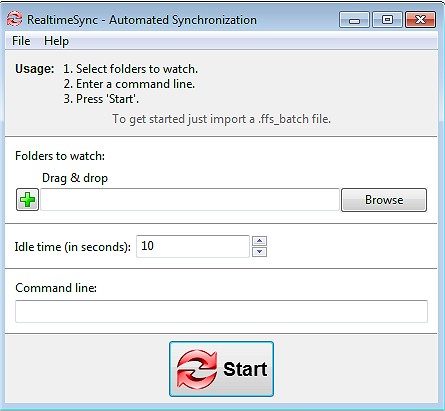
FreeFileSync has released version 14.10, an open-source tool designed for efficient file and folder comparison and synchronization. This software simplifies the process of backing up and syncing files, making it an excellent choice for anyone looking to maintain identical folders across multiple devices, safeguard important data, or manage extensive file transfers—all without the clutter of ads or complex features.
- Real-Time Syncing: Automatically updates files as changes occur, minimizing the risk of data loss.
- Various Sync Options: Offers flexibility with mirror, two-way, and custom sync options, allowing users to tailor data management to their needs.
- Automation: Users can schedule sync tasks to run without manual intervention, enhancing workflow efficiency.
- Cross-Platform Compatibility: Works seamlessly on Windows, macOS, and Linux, making it versatile for different users.
- Versioning & Conflict Detection: Retains older versions of files to prevent accidental loss during syncing.
- No Unnecessary Add-Ons: The tool is free of bloatware and ads, providing a straightforward user experience.
- Everyday Users: For personal file management and backups.
- Professionals & Businesses: To synchronize projects across various locations.
- Creative Professionals: Photographers and videographers can safeguard their media libraries.
- Gamers: Sync saved games across different PCs without losing progress.
- IT Administrators: Automate data backups and server synchronization.
- Cloud Users: Manage backups for services like Google Drive and Dropbox efficiently.
- Setup for Automation: Proper configuration is necessary for batch jobs to ensure effective hands-free backups.
- Understand Permissions: Some files may require admin rights for successful syncing.
Key Features of FreeFileSync:
- Fast & Smart Syncing: Compares files based on size, date, and content to ensure accurate synchronization.- Real-Time Syncing: Automatically updates files as changes occur, minimizing the risk of data loss.
- Various Sync Options: Offers flexibility with mirror, two-way, and custom sync options, allowing users to tailor data management to their needs.
- Automation: Users can schedule sync tasks to run without manual intervention, enhancing workflow efficiency.
- Cross-Platform Compatibility: Works seamlessly on Windows, macOS, and Linux, making it versatile for different users.
- Versioning & Conflict Detection: Retains older versions of files to prevent accidental loss during syncing.
- No Unnecessary Add-Ons: The tool is free of bloatware and ads, providing a straightforward user experience.
Who Can Benefit?
FreeFileSync is suitable for a variety of users:- Everyday Users: For personal file management and backups.
- Professionals & Businesses: To synchronize projects across various locations.
- Creative Professionals: Photographers and videographers can safeguard their media libraries.
- Gamers: Sync saved games across different PCs without losing progress.
- IT Administrators: Automate data backups and server synchronization.
- Cloud Users: Manage backups for services like Google Drive and Dropbox efficiently.
Additional Features:
FreeFileSync also includes drag-and-drop support for easy setup, a portable version for USB use, and compatibility with external and network drives. Users can apply filters and exclusions for fine-tuned synchronization, utilize multi-threaded performance for faster operations, and access detailed sync reports for transparency on changes.Best Practices for Effective Syncing:
- Use Caution with Mirror Sync: This mode deletes files on one side if removed from the other; opt for Two-Way Sync to prevent accidental deletions.- Setup for Automation: Proper configuration is necessary for batch jobs to ensure effective hands-free backups.
- Understand Permissions: Some files may require admin rights for successful syncing.
Conclusion:
FreeFileSync stands out as a reliable, lightweight, and powerful synchronization tool, offering users a straightforward solution for file management without the pitfalls of adware or locked features. Users looking to safeguard their data and streamline their file synchronization processes can download FreeFileSync today and regain control over their backups.Similar Resources:
For more tips on managing files, consider exploring articles on opening File Explorer in Windows, accessing folder options, or quickly locating files in the operating systemFreeFileSync 14.10 released
FreeFileSync is a file/folder comparison and synchronization tool.