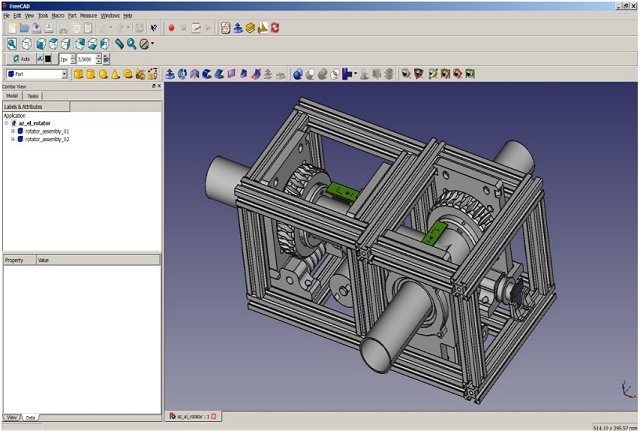
FreeCAD 1.1.1 has been launched, enhancing its status as a versatile parametric 3D modeler tailored for mechanical engineering, product design, and a variety of other engineering applications such as architecture and electrical design. Being an open-source software, FreeCAD is free to use, modify, and enhance, making it a valuable resource for students, hobbyists, small businesses, and anyone looking to minimize software expenses.
Key Features of FreeCAD
FreeCAD’s parametric modeling system allows users to revisit and modify their design history effortlessly. This feature is particularly useful for adjusting previous measurements, enabling iterative design and rapid prototyping. It supports a wide range of file formats—including STEP, IGES, STL, SVG, DXF, OBJ, IFC, and DAE—facilitating smooth import and export across different CAD platforms and 3D printers.
The software boasts a modular workbench system, enabling users to switch between specialized toolsets tailored to various tasks, such as part design, drafting, finite element analysis (FEM), robotic simulation, and even computer-aided manufacturing (CAM) with add-ons for CNC toolpath generation.
Cross-Platform Compatibility and Python Integration
FreeCAD operates seamlessly across Windows, macOS, and Linux, maintaining the same interface and features across platforms. While it is developed in C++ for enhanced performance, its functionality is significantly augmented by Python scripting. This allows users to automate processes, develop custom tools, and create complex parametric designs that can adapt to variables or external data. The well-documented Python API, along with a built-in console for real-time experimentation, further empowers users.
Target Audience
FreeCAD caters to a diverse audience, including students learning CAD, makers designing 3D printed parts, and engineers creating intricate mechanical assemblies. Its capabilities extend to architectural layouts and modeling plumbing and HVAC systems through its Building Information Modeling (BIM) and Mechanical, Electrical, and Plumbing (MEP) modules. Although it may not match the polish of certain commercial software, it offers substantial flexibility and control without the burden of licensing fees.
Pros and Cons
*Pros:*
- Fully free and open-source
- Robust parametric modeling with complete edit history
- Active community support with numerous add-ons
- Built-in Python console for task automation
- Cross-platform usability (Windows, macOS, Linux)
- Regular updates driven by community input
*Cons:*
- Steep learning curve for beginners
- User interface may feel less intuitive compared to commercial alternatives
- Some advanced features are still under development
Conclusion
While FreeCAD may not deliver the same level of polish as premium CAD packages such as Fusion 360, it offers a depth and versatility that is hard to match, especially for a free tool. It serves as an excellent option for individuals eager to venture into CAD design for parts and 3D printing without incurring significant software costs. As the community continues to contribute to its development, FreeCAD is poised to grow in functionality and usability, making it an increasingly valuable asset for creators across various fields.
Future Directions
As FreeCAD evolves, future updates could focus on enhancing the user interface for improved accessibility to beginners, expanding the range of advanced features that are currently in development, and further integrating machine learning or artificial intelligence capabilities to streamline design processes. Additionally, fostering partnerships with educational institutions could enhance its adoption among students and educators alike, ensuring that FreeCAD remains a leading choice for open-source CAD software
Key Features of FreeCAD
FreeCAD’s parametric modeling system allows users to revisit and modify their design history effortlessly. This feature is particularly useful for adjusting previous measurements, enabling iterative design and rapid prototyping. It supports a wide range of file formats—including STEP, IGES, STL, SVG, DXF, OBJ, IFC, and DAE—facilitating smooth import and export across different CAD platforms and 3D printers.
The software boasts a modular workbench system, enabling users to switch between specialized toolsets tailored to various tasks, such as part design, drafting, finite element analysis (FEM), robotic simulation, and even computer-aided manufacturing (CAM) with add-ons for CNC toolpath generation.
Cross-Platform Compatibility and Python Integration
FreeCAD operates seamlessly across Windows, macOS, and Linux, maintaining the same interface and features across platforms. While it is developed in C++ for enhanced performance, its functionality is significantly augmented by Python scripting. This allows users to automate processes, develop custom tools, and create complex parametric designs that can adapt to variables or external data. The well-documented Python API, along with a built-in console for real-time experimentation, further empowers users.
Target Audience
FreeCAD caters to a diverse audience, including students learning CAD, makers designing 3D printed parts, and engineers creating intricate mechanical assemblies. Its capabilities extend to architectural layouts and modeling plumbing and HVAC systems through its Building Information Modeling (BIM) and Mechanical, Electrical, and Plumbing (MEP) modules. Although it may not match the polish of certain commercial software, it offers substantial flexibility and control without the burden of licensing fees.
Pros and Cons
*Pros:*
- Fully free and open-source
- Robust parametric modeling with complete edit history
- Active community support with numerous add-ons
- Built-in Python console for task automation
- Cross-platform usability (Windows, macOS, Linux)
- Regular updates driven by community input
*Cons:*
- Steep learning curve for beginners
- User interface may feel less intuitive compared to commercial alternatives
- Some advanced features are still under development
Conclusion
While FreeCAD may not deliver the same level of polish as premium CAD packages such as Fusion 360, it offers a depth and versatility that is hard to match, especially for a free tool. It serves as an excellent option for individuals eager to venture into CAD design for parts and 3D printing without incurring significant software costs. As the community continues to contribute to its development, FreeCAD is poised to grow in functionality and usability, making it an increasingly valuable asset for creators across various fields.
Future Directions
As FreeCAD evolves, future updates could focus on enhancing the user interface for improved accessibility to beginners, expanding the range of advanced features that are currently in development, and further integrating machine learning or artificial intelligence capabilities to streamline design processes. Additionally, fostering partnerships with educational institutions could enhance its adoption among students and educators alike, ensuring that FreeCAD remains a leading choice for open-source CAD software
FreeCAD 1.1.1 released
FreeCAD is a parametric 3D modeler for CAD, MCAD, CAx, CAE, and PLM aimed directly at mechanical engineering and product design.