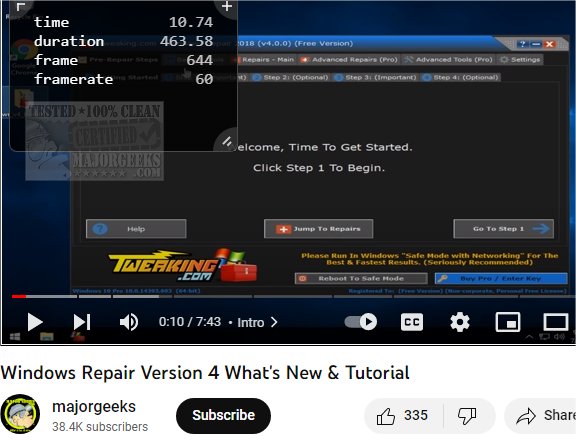
The latest version of Frame By Frame for Chrome and Firefox introduces a variety of features aimed at enhancing video playback analysis. This innovative tool allows users to view critical playback details such as time, total duration, individual frame count, and frame rate simply by hovering their mouse cursor over a video. Users can also navigate through frames using their keyboard's arrow keys, enabling precise control to analyze specific frames in detail.
In addition to its core functionalities, Frame By Frame offers customization options for the overlay, including adjustments to background, outline, and text colors, as well as settings for blur and opacity. Users can also choose to hide the overlay when in fullscreen mode for an uninterrupted viewing experience. Shortcuts can be configured to facilitate quick adjustments in frame rate and navigation between frames, making it a valuable tool for tasks such as extracting images from specific video frames.
Key Features of Frame By Frame:
- Displays current time, video duration, and frame count.
- Navigate frames using the left (⇠) and right (⇢) arrow keys, with an option to move 10 frames at a time when holding the Shift key.
- Select videos by simply hovering over them.
- Hide the Frame By Frame popup using the "i" key.
Permissions Required:
Frame By Frame requires permission to read and change your data on websites you visit. This is essential for the extension to connect with and control the frame-by-frame functionality across any site that hosts videos.
Extension and Future Prospects:
As video content continues to proliferate across platforms, tools like Frame By Frame will become increasingly vital for content creators, educators, and researchers who need precise analysis of visual media. Future updates could focus on enhanced features such as integration with video editing software, support for additional browsers, or collaborative tools for sharing frame analyses with peers. This would further solidify Frame By Frame's position as an indispensable utility for video enthusiasts
In addition to its core functionalities, Frame By Frame offers customization options for the overlay, including adjustments to background, outline, and text colors, as well as settings for blur and opacity. Users can also choose to hide the overlay when in fullscreen mode for an uninterrupted viewing experience. Shortcuts can be configured to facilitate quick adjustments in frame rate and navigation between frames, making it a valuable tool for tasks such as extracting images from specific video frames.
Key Features of Frame By Frame:
- Displays current time, video duration, and frame count.
- Navigate frames using the left (⇠) and right (⇢) arrow keys, with an option to move 10 frames at a time when holding the Shift key.
- Select videos by simply hovering over them.
- Hide the Frame By Frame popup using the "i" key.
Permissions Required:
Frame By Frame requires permission to read and change your data on websites you visit. This is essential for the extension to connect with and control the frame-by-frame functionality across any site that hosts videos.
Extension and Future Prospects:
As video content continues to proliferate across platforms, tools like Frame By Frame will become increasingly vital for content creators, educators, and researchers who need precise analysis of visual media. Future updates could focus on enhanced features such as integration with video editing software, support for additional browsers, or collaborative tools for sharing frame analyses with peers. This would further solidify Frame By Frame's position as an indispensable utility for video enthusiasts
Frame By Frame for Chrome and Firefox 4 released
Frame By Frame for Chrome and Firefox will display various playback details about the video you are watching.
Frame By Frame for Chrome and Firefox 4 released @ MajorGeeks