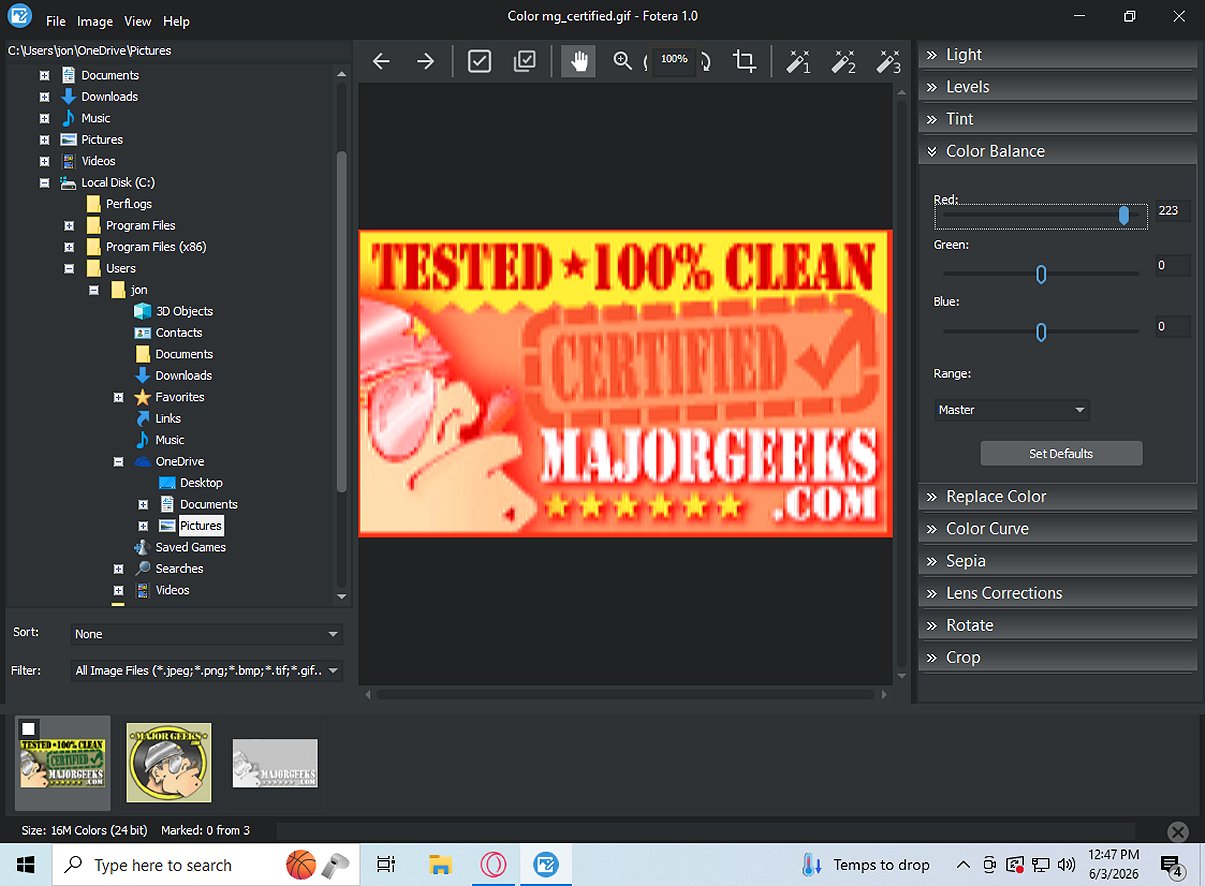
Fotera is a free photo-editing software aimed at users who require quick, efficient, and non-destructive editing capabilities. The software ensures that all modifications are saved separately from the original images, maintaining the integrity of the source files.
Key Features of Fotera
Fotera provides a user-friendly experience that prioritizes the preservation of original images. Users can make various adjustments—such as exposure, contrast, saturation, cropping, and lens corrections—without altering the actual image files. Instead, Fotera saves these changes as distinct edit data linked to each photo, allowing for easy reversion to the original state or final export of edits when satisfied.
The software also incorporates an intuitive folder-based workflow, enabling users to view thumbnails of images, navigate with ease, and manage their workflow efficiently with features like batch exporting, image marking, and sorting.
Support for RAW Photo Editing
A standout aspect of Fotera is its compatibility with various camera RAW formats, providing enhanced editing control with specific RAW settings. Users can select different RAW engines, adjust preview sizes, manage color spaces, and apply auto corrections for accurate color representation.
Comprehensive Image Correction Tools
Fotera is equipped with multiple image correction tools, allowing users to perform transformations such as rotation, cropping, and lens distortion corrections. Additionally, it offers creative editing features, including sepia effects and auto enhancement presets, enabling users to elevate their images with minimal effort.
Exporting Your Edits
Fotera’s batch export functionality allows users to export marked photos into designated folders while applying all non-destructive adjustments to the full-resolution images. This ensures that original files remain untouched, providing a safe and efficient editing experience.
Conclusion
For those seeking a high-quality free photo editing software for Windows, Fotera is an excellent choice. It combines efficient, non-destructive editing with a straightforward interface, ensuring that original images are kept intact while allowing for creative expression. With Fotera, users can confidently edit their photos, knowing that their original masterpieces are safe from alteration.
Future Prospects and Extensions
As Fotera continues to evolve, potential future updates could include enhanced AI-driven features for automatic editing suggestions, improved collaboration tools for sharing edits with peers, and expanded plugin support for additional creative effects. Additionally, incorporating cloud storage options could facilitate easy access to projects across devices, further enhancing the user experience
Key Features of Fotera
Fotera provides a user-friendly experience that prioritizes the preservation of original images. Users can make various adjustments—such as exposure, contrast, saturation, cropping, and lens corrections—without altering the actual image files. Instead, Fotera saves these changes as distinct edit data linked to each photo, allowing for easy reversion to the original state or final export of edits when satisfied.
The software also incorporates an intuitive folder-based workflow, enabling users to view thumbnails of images, navigate with ease, and manage their workflow efficiently with features like batch exporting, image marking, and sorting.
Support for RAW Photo Editing
A standout aspect of Fotera is its compatibility with various camera RAW formats, providing enhanced editing control with specific RAW settings. Users can select different RAW engines, adjust preview sizes, manage color spaces, and apply auto corrections for accurate color representation.
Comprehensive Image Correction Tools
Fotera is equipped with multiple image correction tools, allowing users to perform transformations such as rotation, cropping, and lens distortion corrections. Additionally, it offers creative editing features, including sepia effects and auto enhancement presets, enabling users to elevate their images with minimal effort.
Exporting Your Edits
Fotera’s batch export functionality allows users to export marked photos into designated folders while applying all non-destructive adjustments to the full-resolution images. This ensures that original files remain untouched, providing a safe and efficient editing experience.
Conclusion
For those seeking a high-quality free photo editing software for Windows, Fotera is an excellent choice. It combines efficient, non-destructive editing with a straightforward interface, ensuring that original images are kept intact while allowing for creative expression. With Fotera, users can confidently edit their photos, knowing that their original masterpieces are safe from alteration.
Future Prospects and Extensions
As Fotera continues to evolve, potential future updates could include enhanced AI-driven features for automatic editing suggestions, improved collaboration tools for sharing edits with peers, and expanded plugin support for additional creative effects. Additionally, incorporating cloud storage options could facilitate easy access to projects across devices, further enhancing the user experience
Fotera 2.5 released
Fotera is freeware photo-editing software tailored for individuals seeking quick, efficient, and non-destructive image editing. It ensures that every modification is saved separately from the original image, preserving the integrity of your source photos.