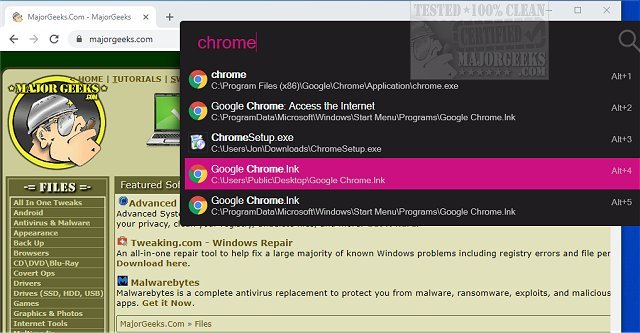
Flow Launcher is a versatile, open-source application designed to enhance system navigation for Windows users. The latest release, version 2.1.2, continues to provide users with a rapid search tool that streamlines the process of launching applications, accessing files, and executing commands—all from a single, keyboard-driven search bar. This utility is particularly beneficial for those frustrated with the traditional Windows Search, which can often be slow or inefficient.
Flow Launcher replaces the need for lengthy navigation through the Start Menu with a simple keystroke: press Alt+Space, type your query, and hit Enter. It allows users to quickly locate applications, files, folders, Windows settings, browser bookmarks, and more. The launcher also supports a variety of plugins that extend its functionality beyond basic app launching, turning it into a comprehensive command center. Users can integrate tools for YouTube searches, clipboard management, and even smart home controls.
While Windows Search has improved over time, it can still be hit or miss, often leading to irrelevant results or delays. Flow Launcher, on the other hand, provides a more reliable and speedy alternative. It is especially advantageous for users with cluttered desktops or extensive lists of pinned applications. For instance, on a busy work PC, it allows seamless access to tools like "Device Manager" or a "Downloads" folder without the hassle of mouse navigation.
The default hotkey, Alt+Space, can be customized based on user preferences. Flow Launcher supports various functionalities, including:
- Launching applications and executing commands with ease.
- Performing calculations directly in the search bar.
- Quickly searching through Windows and Control Panel settings.
- Using a Game Mode to prevent interruptions during gameplay.
Additionally, the application can utilize Windows Index or the fast file search tool "Everything," enhancing file access speed significantly.
The plugin system is where Flow Launcher truly shines. Users can browse and install plugins from a built-in Plugin Store or manage them via command inputs. These plugins can introduce new search capabilities, integrations, and shortcuts, allowing users to tailor the launcher to their specific needs. This flexibility ensures that Flow Launcher can remain lightweight for casual users or transform into a robust utility for power users.
Getting started with Flow Launcher is straightforward. After installation, users can launch it by pressing Alt+Space and entering their desired command or application name. For optimal use, exploring the settings to adjust hotkeys, enable necessary plugins, and select a visually appealing theme is recommended. The application also offers dark mode support and various customization options.
For example, if a user is troubleshooting a Windows startup issue, they can quickly navigate between tools like Task Manager and Services by typing the respective names into Flow Launcher, significantly reducing the time spent searching through menus.
While Flow Launcher is a powerful tool, it may not be necessary for every Windows user. Those who only use a few applications might find it excessive. The plugin system, while beneficial, can also create complexity, as not all plugins are equally polished and may require troubleshooting. Additionally, users should be cautious about downloading the application from trusted sources to avoid potential security warnings from Windows.
Flow Launcher 2.1.2 is an invaluable tool for both casual and power users seeking to improve their Windows experience. With its fast search capabilities, extensive plugin options, and customizable features, it stands out as a robust alternative to the traditional Windows Search. Whether you're looking to enhance productivity or simply streamline your workflow, Flow Launcher is well worth exploring
Key Features of Flow Launcher
Flow Launcher replaces the need for lengthy navigation through the Start Menu with a simple keystroke: press Alt+Space, type your query, and hit Enter. It allows users to quickly locate applications, files, folders, Windows settings, browser bookmarks, and more. The launcher also supports a variety of plugins that extend its functionality beyond basic app launching, turning it into a comprehensive command center. Users can integrate tools for YouTube searches, clipboard management, and even smart home controls.
Advantages Over Windows Search
While Windows Search has improved over time, it can still be hit or miss, often leading to irrelevant results or delays. Flow Launcher, on the other hand, provides a more reliable and speedy alternative. It is especially advantageous for users with cluttered desktops or extensive lists of pinned applications. For instance, on a busy work PC, it allows seamless access to tools like "Device Manager" or a "Downloads" folder without the hassle of mouse navigation.
Useful Features and Customization
The default hotkey, Alt+Space, can be customized based on user preferences. Flow Launcher supports various functionalities, including:
- Launching applications and executing commands with ease.
- Performing calculations directly in the search bar.
- Quickly searching through Windows and Control Panel settings.
- Using a Game Mode to prevent interruptions during gameplay.
Additionally, the application can utilize Windows Index or the fast file search tool "Everything," enhancing file access speed significantly.
Plugin Ecosystem
The plugin system is where Flow Launcher truly shines. Users can browse and install plugins from a built-in Plugin Store or manage them via command inputs. These plugins can introduce new search capabilities, integrations, and shortcuts, allowing users to tailor the launcher to their specific needs. This flexibility ensures that Flow Launcher can remain lightweight for casual users or transform into a robust utility for power users.
Installation and Usage
Getting started with Flow Launcher is straightforward. After installation, users can launch it by pressing Alt+Space and entering their desired command or application name. For optimal use, exploring the settings to adjust hotkeys, enable necessary plugins, and select a visually appealing theme is recommended. The application also offers dark mode support and various customization options.
Real-World Application
For example, if a user is troubleshooting a Windows startup issue, they can quickly navigate between tools like Task Manager and Services by typing the respective names into Flow Launcher, significantly reducing the time spent searching through menus.
Limitations and Considerations
While Flow Launcher is a powerful tool, it may not be necessary for every Windows user. Those who only use a few applications might find it excessive. The plugin system, while beneficial, can also create complexity, as not all plugins are equally polished and may require troubleshooting. Additionally, users should be cautious about downloading the application from trusted sources to avoid potential security warnings from Windows.
Conclusion
Flow Launcher 2.1.2 is an invaluable tool for both casual and power users seeking to improve their Windows experience. With its fast search capabilities, extensive plugin options, and customizable features, it stands out as a robust alternative to the traditional Windows Search. Whether you're looking to enhance productivity or simply streamline your workflow, Flow Launcher is well worth exploring
Flow Launcher 2.1.2 released
Flow Launcher is an Open Source system navigation tool that enables fast search results.