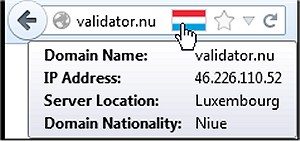
The latest release of Flagfox for Firefox, version 6.2.1, enhances the browsing experience by displaying a flag icon that represents the physical location of the web server you are connected to. This feature not only increases user awareness regarding the geographical context of their connection but also adds a layer of security. Understanding the server's location can help users identify potential language settings and applicable legal jurisdictions.
Flagfox allows users to access additional information through various external lookups and offers customization options, enabling users to add their own actions to the flag icon's context menu or utilize keyboard shortcuts for efficient navigation. By clicking on the flag icon, users can access the Geo tool, which provides a detailed map pinpointing the server's location, as well as additional details like local time and Internet Service Provider (ISP) information.
Key features of Flagfox include site safety checks for malware, finding similar websites and reviews, automatic translation services, SEO and web development tools, diagnostic tools such as pings and traceroutes, Whois and DNS information, page code validation, quick URL shortening, and the ability to copy server IP addresses or create custom actions.
In summary, Flagfox is a versatile tool that enhances the Firefox browsing experience by providing valuable geographical and technical information about web servers, helping users make informed decisions while online.
As web browsing becomes increasingly globalized and complex, tools like Flagfox are essential for users who prioritize transparency and security in their online activities. In future updates, it would be beneficial for Flagfox to incorporate even more real-time data analytics, user privacy features, and integration with other security tools to further empower users in navigating the internet safely and efficiently
Flagfox allows users to access additional information through various external lookups and offers customization options, enabling users to add their own actions to the flag icon's context menu or utilize keyboard shortcuts for efficient navigation. By clicking on the flag icon, users can access the Geo tool, which provides a detailed map pinpointing the server's location, as well as additional details like local time and Internet Service Provider (ISP) information.
Key features of Flagfox include site safety checks for malware, finding similar websites and reviews, automatic translation services, SEO and web development tools, diagnostic tools such as pings and traceroutes, Whois and DNS information, page code validation, quick URL shortening, and the ability to copy server IP addresses or create custom actions.
In summary, Flagfox is a versatile tool that enhances the Firefox browsing experience by providing valuable geographical and technical information about web servers, helping users make informed decisions while online.
As web browsing becomes increasingly globalized and complex, tools like Flagfox are essential for users who prioritize transparency and security in their online activities. In future updates, it would be beneficial for Flagfox to incorporate even more real-time data analytics, user privacy features, and integration with other security tools to further empower users in navigating the internet safely and efficiently
Flagfox for Firefox 6.2.1 released
Flagfox is a Firefox add-on that displays a flag icon indicating the current webserver's physical location.