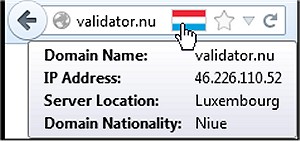
The latest version of Flagfox for Firefox, 6.1.98, has been released, enhancing the browsing experience by providing users with an informative flag icon that represents the physical location of the current webserver. This feature not only enhances user awareness but also adds a layer of security while online. By knowing where your connection is established, users can infer the native language of the website and understand the applicable legal jurisdiction.
Flagfox offers a rich array of functionalities through external lookups, enabling users to access extensive information with a simple click on the flag icon. This includes a detailed map of the server's location, local time, and Internet Service Provider (ISP) details. Additionally, the add-on allows for customization, enabling users to create personalized actions within the context menu of the flag icon or utilize keyboard shortcuts for efficient navigation.
Key features of Flagfox include:
- Site safety and malware assessments
- Discovery of similar websites and reviews
- Automatic translation services
- Tools for SEO and web development research
- Diagnostic utilities such as pings and traceroutes
- Access to Whois and DNS information
- Page code validation
- Quick URL shortening capabilities
- Options to copy server IP addresses or other relevant information, along with the ability to implement custom actions.
For users looking to optimize their browsing experience further, there are related guides available on speeding up browsers like Firefox, Chrome, and Safari, as well as instructions for resetting or repairing these browsers, and muting tabs across different platforms.
In summary, Flagfox 6.1.98 not only serves as a tool for geographical awareness while browsing but also equips users with an extensive set of resources to enhance their online safety and efficiency. As online security becomes increasingly important, tools like Flagfox can play a critical role in informed and secure web navigation
Flagfox offers a rich array of functionalities through external lookups, enabling users to access extensive information with a simple click on the flag icon. This includes a detailed map of the server's location, local time, and Internet Service Provider (ISP) details. Additionally, the add-on allows for customization, enabling users to create personalized actions within the context menu of the flag icon or utilize keyboard shortcuts for efficient navigation.
Key features of Flagfox include:
- Site safety and malware assessments
- Discovery of similar websites and reviews
- Automatic translation services
- Tools for SEO and web development research
- Diagnostic utilities such as pings and traceroutes
- Access to Whois and DNS information
- Page code validation
- Quick URL shortening capabilities
- Options to copy server IP addresses or other relevant information, along with the ability to implement custom actions.
For users looking to optimize their browsing experience further, there are related guides available on speeding up browsers like Firefox, Chrome, and Safari, as well as instructions for resetting or repairing these browsers, and muting tabs across different platforms.
In summary, Flagfox 6.1.98 not only serves as a tool for geographical awareness while browsing but also equips users with an extensive set of resources to enhance their online safety and efficiency. As online security becomes increasingly important, tools like Flagfox can play a critical role in informed and secure web navigation
Flagfox for Firefox 6.1.98 released
Flagfox is a Firefox add-on that displays a flag icon indicating the current webserver's physical location.