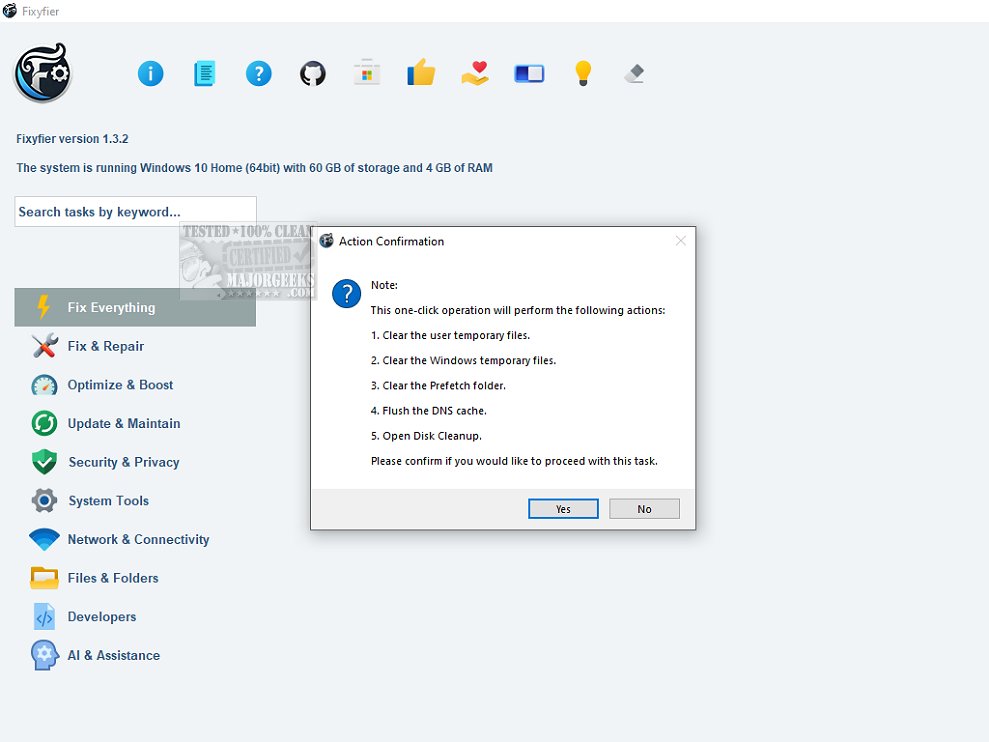
Fixyfier has recently launched its latest version, 8.2.0, enhancing its reputation as a comprehensive software solution for tackling common issues within the Windows operating system. This tool is crafted to assist users—from IT professionals to everyday individuals—in repairing, tweaking, and optimizing their systems effectively.
Fixyfier consolidates various native Windows repair tools such as DISM, SFC, and Windows Troubleshooters into a single user-friendly interface. This means users no longer have to memorize commands or navigate through complex menus to perform essential repairs. With Fixyfier, users can address a multitude of issues, including network connectivity problems, system file corruption, and other performance disruptions, all from one centralized location.
The software provides access to a range of built-in repair features that are critical for maintaining system integrity. These include utilities for restoring damaged system files and troubleshooting various operational problems without the need for a complete system reinstall. The intuitive interface simplifies the navigation of complex troubleshooting tasks, making it accessible for users of all skill levels.
In addition to its repair capabilities, Fixyfier offers immediate feedback on system health, presenting detailed reports on repairs performed and fixes applied. Continuous health checks monitor system performance and resource usage, enabling users to identify and address potential issues before they escalate. This proactive approach helps ensure smoother operations and reduces downtime, ultimately enhancing productivity.
Furthermore, Fixyfier allows users to generate log files for current system states, such as event logs or error reports, which can be invaluable for further analysis. Users can also create batch files for repetitive repair tasks, making it easier to automate processes and streamline maintenance.
In summary, Fixyfier 8.2.0 stands out as an essential tool for Windows users aiming to optimize their system's performance and troubleshoot issues efficiently. Its user-centric design and robust feature set make it a must-have for anyone looking to enhance their Windows experience.
Looking ahead, the developers of Fixyfier may consider incorporating additional features such as scheduled maintenance tasks, integration with cloud services for backup and restoration, and broader compatibility with other operating systems to further solidify its position as a leading solution in system optimization and repair
What Does Fixyfier Do?
Fixyfier consolidates various native Windows repair tools such as DISM, SFC, and Windows Troubleshooters into a single user-friendly interface. This means users no longer have to memorize commands or navigate through complex menus to perform essential repairs. With Fixyfier, users can address a multitude of issues, including network connectivity problems, system file corruption, and other performance disruptions, all from one centralized location.
Comprehensive Tools for Common Windows Issues
The software provides access to a range of built-in repair features that are critical for maintaining system integrity. These include utilities for restoring damaged system files and troubleshooting various operational problems without the need for a complete system reinstall. The intuitive interface simplifies the navigation of complex troubleshooting tasks, making it accessible for users of all skill levels.
Health Checks, Reporting, and Automation
In addition to its repair capabilities, Fixyfier offers immediate feedback on system health, presenting detailed reports on repairs performed and fixes applied. Continuous health checks monitor system performance and resource usage, enabling users to identify and address potential issues before they escalate. This proactive approach helps ensure smoother operations and reduces downtime, ultimately enhancing productivity.
Furthermore, Fixyfier allows users to generate log files for current system states, such as event logs or error reports, which can be invaluable for further analysis. Users can also create batch files for repetitive repair tasks, making it easier to automate processes and streamline maintenance.
Conclusion and Future Outlook
In summary, Fixyfier 8.2.0 stands out as an essential tool for Windows users aiming to optimize their system's performance and troubleshoot issues efficiently. Its user-centric design and robust feature set make it a must-have for anyone looking to enhance their Windows experience.
Looking ahead, the developers of Fixyfier may consider incorporating additional features such as scheduled maintenance tasks, integration with cloud services for backup and restoration, and broader compatibility with other operating systems to further solidify its position as a leading solution in system optimization and repair
Fixyfier 8.2.0 released
Fixyfier is designed to be a comprehensive software solution for addressing and resolving common issues within the Windows operating system.