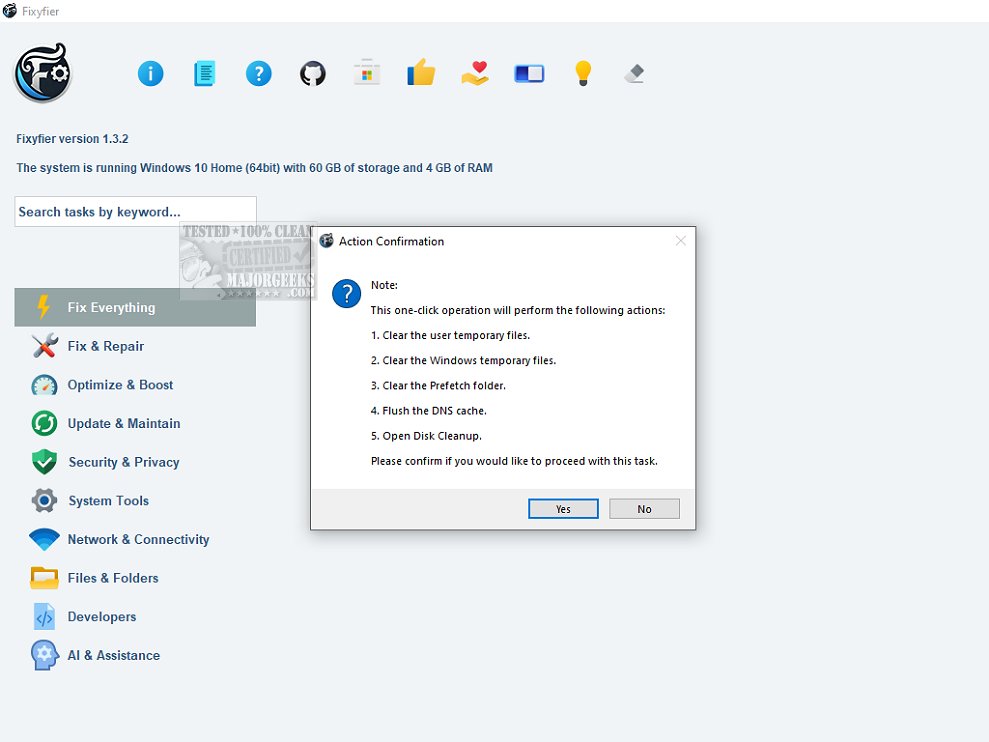
Fixyfier has just launched version 7.3.1, an advanced software tool designed to address and resolve a range of common issues within the Windows operating system. This comprehensive solution is tailored for both IT professionals and everyday users, offering a user-friendly experience aimed at repairing, tweaking, or enhancing system performance.
Key Features of Fixyfier
Fixyfier consolidates various native Windows repair tools, including DISM, SFC, and Windows Troubleshooters, into a single platform. This eliminates the need for users to remember different commands or navigate through multiple menus, streamlining the repair process significantly.
With Fixyfier, users can effectively fix a multitude of problems such as network connectivity issues, system file corruption, and other disruptions. It offers a one-stop solution for repairing and optimizing essential components of the Windows OS, ensuring enhanced performance and stability. The software also leverages AI-driven analysis to provide personalized suggestions for addressing common PC problems, facilitating swift diagnosis and resolution.
Centralized Tools for Common Issues
Fixyfier features a variety of built-in repair functionalities accessible from a centralized interface. Tools such as the System File Checker and network diagnostics are included to tackle common issues without the need for a complete system reinstall. The straightforward and intuitive design of Fixyfier makes complex troubleshooting tasks manageable, allowing users to restore damaged system files and repair essential Windows components efficiently.
Health Checks and Reporting
In addition to repair functions, Fixyfier provides immediate feedback regarding system health, offering detailed reports on completed repairs and fixes. Continuous health checks monitor system performance and resource usage, helping users identify and troubleshoot potential issues proactively. This minimizes downtime and enhances productivity. Users can also generate log files, including event logs and error reports, for further analysis. For those needing to repeat repairs, Fixyfier allows the creation of batch files, making it easier to automate or schedule repairs for later execution.
Conclusion: The Geek Verdict
Overall, Fixyfier is an excellent tool for optimizing and troubleshooting Windows systems effortlessly. Its user-friendly design and efficient functionalities make it a must-have for anyone looking to improve their PC's performance. With its latest update, Fixyfier continues to be an essential resource for maintaining a smooth and efficient Windows experience.
Future Developments
Looking ahead, Fixyfier aims to incorporate even more advanced features, including enhanced AI capabilities for predictive maintenance, expanded troubleshooting tools for emerging Windows issues, and potential integration with cloud-based services for real-time monitoring and repair assistance. This will further solidify its position as a leading solution in the realm of Windows maintenance and optimization
Key Features of Fixyfier
Fixyfier consolidates various native Windows repair tools, including DISM, SFC, and Windows Troubleshooters, into a single platform. This eliminates the need for users to remember different commands or navigate through multiple menus, streamlining the repair process significantly.
With Fixyfier, users can effectively fix a multitude of problems such as network connectivity issues, system file corruption, and other disruptions. It offers a one-stop solution for repairing and optimizing essential components of the Windows OS, ensuring enhanced performance and stability. The software also leverages AI-driven analysis to provide personalized suggestions for addressing common PC problems, facilitating swift diagnosis and resolution.
Centralized Tools for Common Issues
Fixyfier features a variety of built-in repair functionalities accessible from a centralized interface. Tools such as the System File Checker and network diagnostics are included to tackle common issues without the need for a complete system reinstall. The straightforward and intuitive design of Fixyfier makes complex troubleshooting tasks manageable, allowing users to restore damaged system files and repair essential Windows components efficiently.
Health Checks and Reporting
In addition to repair functions, Fixyfier provides immediate feedback regarding system health, offering detailed reports on completed repairs and fixes. Continuous health checks monitor system performance and resource usage, helping users identify and troubleshoot potential issues proactively. This minimizes downtime and enhances productivity. Users can also generate log files, including event logs and error reports, for further analysis. For those needing to repeat repairs, Fixyfier allows the creation of batch files, making it easier to automate or schedule repairs for later execution.
Conclusion: The Geek Verdict
Overall, Fixyfier is an excellent tool for optimizing and troubleshooting Windows systems effortlessly. Its user-friendly design and efficient functionalities make it a must-have for anyone looking to improve their PC's performance. With its latest update, Fixyfier continues to be an essential resource for maintaining a smooth and efficient Windows experience.
Future Developments
Looking ahead, Fixyfier aims to incorporate even more advanced features, including enhanced AI capabilities for predictive maintenance, expanded troubleshooting tools for emerging Windows issues, and potential integration with cloud-based services for real-time monitoring and repair assistance. This will further solidify its position as a leading solution in the realm of Windows maintenance and optimization
Fixyfier 7.3.1 released
Fixyfier is designed to be a comprehensive software solution for addressing and resolving common issues within the Windows operating system.