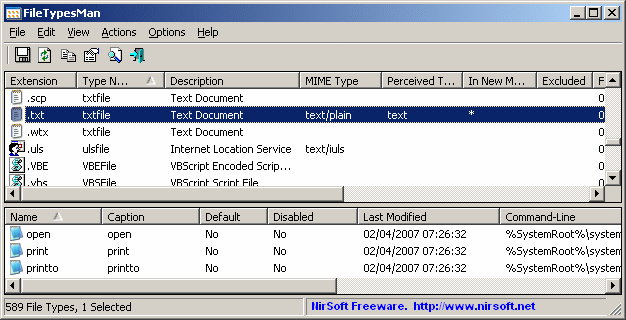
FileTypesMan version 2.01 has been released, providing users with a powerful alternative to the 'File Types' tab found in the 'Folder Options' of Windows. This utility presents a comprehensive list of all file extensions and types registered on the user's computer, offering detailed information for each file type, including the Type Name, Description, MIME Type, Perceived Type, Flags, Browser Flags, and more.
In addition to viewing file types, FileTypesMan enables users to easily edit the properties and flags associated with each file type. Users can add, modify, or remove actions related to specific file types, enhancing their control over file management on their systems.
The tool is particularly useful for those looking to customize their file handling experience beyond the limitations of the default Windows interface. For users interested in additional guidance, the text references several related articles on file management and settings customization in Windows 10 and 11, offering tips on resetting folder view settings, showing or hiding file name extensions, restarting File Explorer, displaying the actual path in File Explorer, and managing the status bar.
In summary, FileTypesMan 2.01 is a versatile tool for Windows users who want to take charge of their file types and extensions, providing a user-friendly interface for file management and customization. Its capabilities can significantly enhance the efficiency of file handling tasks, making it a valuable addition to any user's toolkit
In addition to viewing file types, FileTypesMan enables users to easily edit the properties and flags associated with each file type. Users can add, modify, or remove actions related to specific file types, enhancing their control over file management on their systems.
The tool is particularly useful for those looking to customize their file handling experience beyond the limitations of the default Windows interface. For users interested in additional guidance, the text references several related articles on file management and settings customization in Windows 10 and 11, offering tips on resetting folder view settings, showing or hiding file name extensions, restarting File Explorer, displaying the actual path in File Explorer, and managing the status bar.
In summary, FileTypesMan 2.01 is a versatile tool for Windows users who want to take charge of their file types and extensions, providing a user-friendly interface for file management and customization. Its capabilities can significantly enhance the efficiency of file handling tasks, making it a valuable addition to any user's toolkit
FileTypesMan 2.01 released
FileTypesMan is an alternative to the 'File Types' tab in the 'Folder Options' of Windows.