FileProtection version 4.77 has been released, offering users an efficient way to safeguard their files against accidental deletions and malicious software. This user-friendly tool ensures that your files remain secure, allowing for worry-free management of sensitive data.
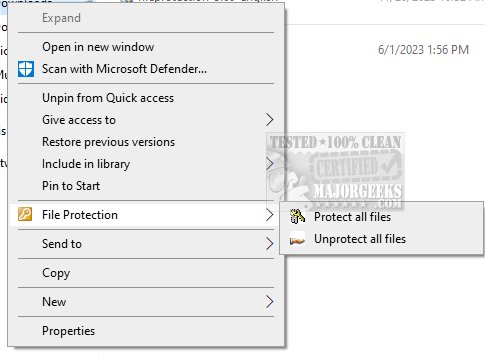
To utilize FileProtection, simply right-click on the file or folder you wish to protect and select the "File Protection" option. Once activated, a dot will appear on the icon's lower-left corner to signify its protected status. It is recommended to protect files that should not be modified, such as photographs and official documents, to prevent unauthorized access and maintain the integrity of your important information.
For users needing to remove File Protection, there are two methods available: confirming the removal when prompted by User Account Control (UAC) or entering a password set in the settings for those without administrative rights. The effectiveness of FileProtection is contingent on having UAC enabled or operating under a non-administrative account.
Additionally, users may find it beneficial to explore related topics, such as taking full ownership of files and folders, securely deleting files using PowerShell, and customizing context menu options for enhanced file management in Windows operating systems.
In conclusion, FileProtection 4.77 is a valuable tool for anyone looking to enhance their data security and prevent unintentional file loss. By implementing such protective measures, users can ensure their sensitive information remains safe from both accidental and malicious threats
To utilize FileProtection, simply right-click on the file or folder you wish to protect and select the "File Protection" option. Once activated, a dot will appear on the icon's lower-left corner to signify its protected status. It is recommended to protect files that should not be modified, such as photographs and official documents, to prevent unauthorized access and maintain the integrity of your important information.
For users needing to remove File Protection, there are two methods available: confirming the removal when prompted by User Account Control (UAC) or entering a password set in the settings for those without administrative rights. The effectiveness of FileProtection is contingent on having UAC enabled or operating under a non-administrative account.
Additionally, users may find it beneficial to explore related topics, such as taking full ownership of files and folders, securely deleting files using PowerShell, and customizing context menu options for enhanced file management in Windows operating systems.
In conclusion, FileProtection 4.77 is a valuable tool for anyone looking to enhance their data security and prevent unintentional file loss. By implementing such protective measures, users can ensure their sensitive information remains safe from both accidental and malicious threats
FileProtection 4.77 released
FileProtection is a simple and effective tool that allows you to protect your files from accidental deletion and malicious software easily.