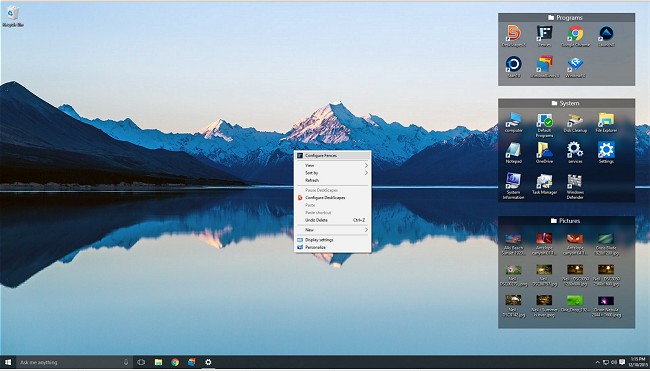
Fences has released its latest version, 6.20 / 4.21, which continues to provide tools for organizing your desktop and managing icons effectively. This software allows users to create "fences," which are labeled shaded areas that function as movable and resizable containers for desktop icons. Key features of Fences include the ability to:
- Organize icons by creating designated "fences" on your desktop
- Easily hide or show desktop icons with a simple click
- Mirror the contents of folders directly on the desktop
- Automatically sort new desktop icons into the appropriate "fence"
Additionally, the software has a built-in functionality that adds convenience to desktop management, enhancing the user experience by reducing clutter.
For users interested in improving their desktop organization further, there are related topics such as enabling or disabling the "Show Desktop" feature in Windows 11, creating desktop shortcuts in Windows 10 and 11, managing desktop background images, and understanding desktop.ini files.
To extend this information, Fences could incorporate more customization options for users to personalize their desktop experience, such as different color schemes for fences, the ability to set priority levels for certain icons, or integration with task management tools for better productivity. Furthermore, future updates could include enhanced compatibility with multiple monitors, allowing users to manage their icons across different screens seamlessly
- Organize icons by creating designated "fences" on your desktop
- Easily hide or show desktop icons with a simple click
- Mirror the contents of folders directly on the desktop
- Automatically sort new desktop icons into the appropriate "fence"
Additionally, the software has a built-in functionality that adds convenience to desktop management, enhancing the user experience by reducing clutter.
For users interested in improving their desktop organization further, there are related topics such as enabling or disabling the "Show Desktop" feature in Windows 11, creating desktop shortcuts in Windows 10 and 11, managing desktop background images, and understanding desktop.ini files.
To extend this information, Fences could incorporate more customization options for users to personalize their desktop experience, such as different color schemes for fences, the ability to set priority levels for certain icons, or integration with task management tools for better productivity. Furthermore, future updates could include enhanced compatibility with multiple monitors, allowing users to manage their icons across different screens seamlessly
Fences 6.20 / 4.21 released
Fences will help you organize your desktop and hide your icons when they're not in use.