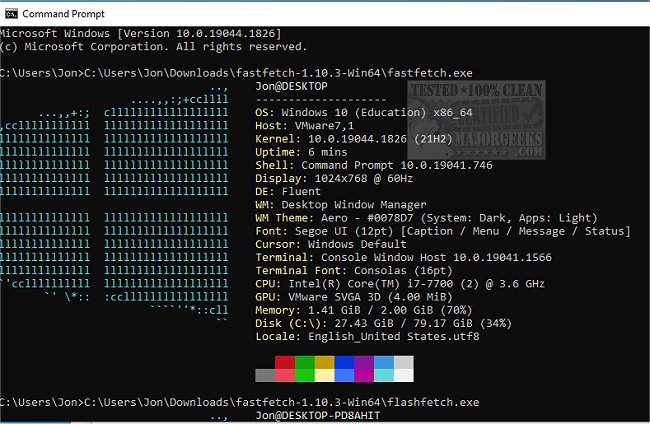
Fastfetch version 2.64.0 has been released, enhancing its functionality as an Open Source multi-platform application designed to swiftly fetch and display system information. Written primarily in C, Fastfetch prioritizes performance and customizability, making it a valuable tool for users looking to visualize their system's specs in an attractive manner.
The application comprises two executables that can be configured using various flags, which can be made persistent by saving them in the configuration file located at $XDG_CONFIG_HOME/fastfetch/config.conf. Users can explore the available configuration options by executing the command `fastfetch --help`. The second executable, named flashfetch, is optimized at compile time to minimize overhead, with configurations managed directly in its source file, src/flashfetch.c.
Fastfetch is under continuous development, promising the addition of more features and options, which can be particularly beneficial for users with slower machines. To assist users, the application includes several pre-made configuration files found in the presets directory, which can be loaded using the `--load-config` flag. These preset files also serve as useful examples for formatting arguments.
The logos displayed by Fastfetch are highly customizable, with detailed documentation available in the developer repository for those interested in tweaking them further.
In summary, Fastfetch not only offers a simple way to display system information but also encourages user creativity and customization. As it evolves with community contributions and updates, users can look forward to enhanced features that cater to their varying needs for system diagnostics.
Moving forward, users can expect further improvements and possibly new features that enhance the overall user experience. The community surrounding Fastfetch may also contribute additional presets and configurations, fostering a collaborative environment for sharing tips and tricks on optimizing system information display
The application comprises two executables that can be configured using various flags, which can be made persistent by saving them in the configuration file located at $XDG_CONFIG_HOME/fastfetch/config.conf. Users can explore the available configuration options by executing the command `fastfetch --help`. The second executable, named flashfetch, is optimized at compile time to minimize overhead, with configurations managed directly in its source file, src/flashfetch.c.
Fastfetch is under continuous development, promising the addition of more features and options, which can be particularly beneficial for users with slower machines. To assist users, the application includes several pre-made configuration files found in the presets directory, which can be loaded using the `--load-config` flag. These preset files also serve as useful examples for formatting arguments.
The logos displayed by Fastfetch are highly customizable, with detailed documentation available in the developer repository for those interested in tweaking them further.
In summary, Fastfetch not only offers a simple way to display system information but also encourages user creativity and customization. As it evolves with community contributions and updates, users can look forward to enhanced features that cater to their varying needs for system diagnostics.
Moving forward, users can expect further improvements and possibly new features that enhance the overall user experience. The community surrounding Fastfetch may also contribute additional presets and configurations, fostering a collaborative environment for sharing tips and tricks on optimizing system information display
Fastfetch 2.64.0 released
Fastfetch is an Open Source multi-platform app capable of quickly fetching and displaying system info.