FanCtrl 1.8.0 has been released, providing users with an open-source solution for automatically adjusting and controlling the fan speeds of their PCs. While the application is designed to be user-friendly, it is particularly suited for advanced users due to its potential risks, such as overheating or conflicts with other software and processors. As a project developed by an independent developer, FanCtrl may not support all motherboards.
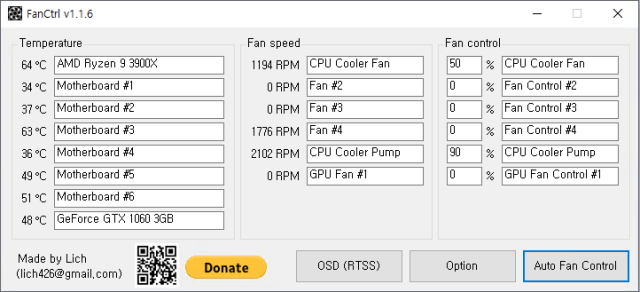
The app features a well-organized interface that resides in the system tray, displaying the motherboard name along with each fan's speed and controls, which can be customized. Users can access several options by right-clicking the icon, including enabling automatic fan control, OSD (RTSS), and various performance modes like Normal, Silence, Performance, and Game. Upon launching FanCtrl, users can monitor temperatures and adjust fan speeds (in percentage) as needed.
FanCtrl also integrates well with tools like LibreHardwareMonitor and Open Hardware Monitor, offering a range of options for tech enthusiasts. It is especially appealing to those who enjoy overclocking, as it allows for precise control and monitoring of fan speeds and temperatures.
For those interested in optimizing their PC performance, FanCtrl serves as a valuable tool, alongside resources that help users learn more about their hardware, such as tutorials on identifying CPU cores and understanding processor generations.
In the future, updates to FanCtrl could enhance compatibility with a broader range of motherboards and improve user safety features to minimize the risk of damage to systems. Additionally, further development could expand its integration capabilities with other monitoring software, making it an even more versatile tool for PC enthusiasts
The app features a well-organized interface that resides in the system tray, displaying the motherboard name along with each fan's speed and controls, which can be customized. Users can access several options by right-clicking the icon, including enabling automatic fan control, OSD (RTSS), and various performance modes like Normal, Silence, Performance, and Game. Upon launching FanCtrl, users can monitor temperatures and adjust fan speeds (in percentage) as needed.
FanCtrl also integrates well with tools like LibreHardwareMonitor and Open Hardware Monitor, offering a range of options for tech enthusiasts. It is especially appealing to those who enjoy overclocking, as it allows for precise control and monitoring of fan speeds and temperatures.
For those interested in optimizing their PC performance, FanCtrl serves as a valuable tool, alongside resources that help users learn more about their hardware, such as tutorials on identifying CPU cores and understanding processor generations.
In the future, updates to FanCtrl could enhance compatibility with a broader range of motherboards and improve user safety features to minimize the risk of damage to systems. Additionally, further development could expand its integration capabilities with other monitoring software, making it an even more versatile tool for PC enthusiasts
FanCtrl 1.8.0 released
FanCtrl is an Open Source app to adjust and control the fan speed on your PC automatically.