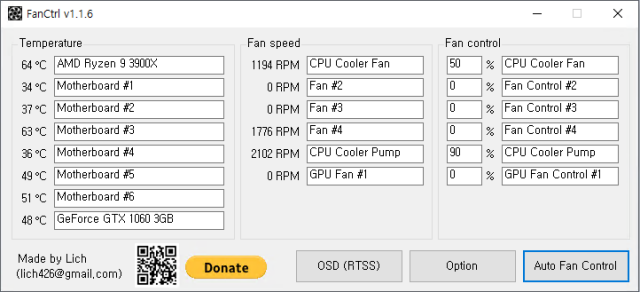
FanCtrl version 1.7.9 has been released, offering an open-source solution for automatically adjusting and controlling fan speeds on PCs. While the app is user-friendly, it is primarily designed for advanced users who understand the potential risks, such as overheating or conflicts with other system processors and monitoring software. As an indie-developed application, compatibility may vary with different motherboards.
The interface is well-organized, allowing users to manage fan speeds and temperatures from the system tray, where they can easily enable automatic fan control, access on-screen display (OSD) features, and switch between different modes like Normal, Silence, Performance, and Game. The app also integrates well with tools like LibreHardwareMonitor and Open Hardware Monitor, enhancing its functionality.
FanCtrl is particularly appealing to enthusiasts who enjoy overclocking, as it provides detailed information about fan speeds and system temperatures, enabling meticulous adjustments. The app is a valuable resource for tech-savvy individuals looking to optimize their PC's cooling performance.
In addition to FanCtrl's features, users might find interest in related topics such as identifying CPU cores, understanding Intel processor generations, and ensuring safe operating conditions for their computers. Overall, FanCtrl stands out as a powerful tool for those looking to take control of their PC cooling systems.
Furthermore, it would be beneficial to explore community forums or user manuals for tips on maximizing the app's potential and troubleshooting any compatibility issues with specific hardware setups. Engaging with the community can also provide insights into unique configurations and shared experiences that enhance the overall use of FanCtrl
The interface is well-organized, allowing users to manage fan speeds and temperatures from the system tray, where they can easily enable automatic fan control, access on-screen display (OSD) features, and switch between different modes like Normal, Silence, Performance, and Game. The app also integrates well with tools like LibreHardwareMonitor and Open Hardware Monitor, enhancing its functionality.
FanCtrl is particularly appealing to enthusiasts who enjoy overclocking, as it provides detailed information about fan speeds and system temperatures, enabling meticulous adjustments. The app is a valuable resource for tech-savvy individuals looking to optimize their PC's cooling performance.
In addition to FanCtrl's features, users might find interest in related topics such as identifying CPU cores, understanding Intel processor generations, and ensuring safe operating conditions for their computers. Overall, FanCtrl stands out as a powerful tool for those looking to take control of their PC cooling systems.
Furthermore, it would be beneficial to explore community forums or user manuals for tips on maximizing the app's potential and troubleshooting any compatibility issues with specific hardware setups. Engaging with the community can also provide insights into unique configurations and shared experiences that enhance the overall use of FanCtrl
FanCtrl 1.7.9 released
FanCtrl is an Open Source app to adjust and control the fan speed on your PC automatically.