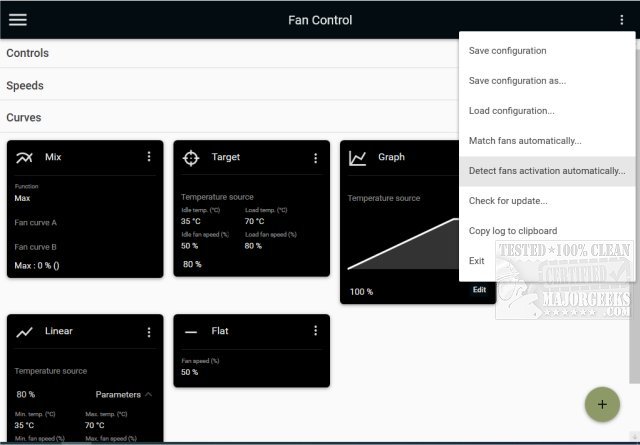
FanControl is an advanced, open-source utility designed for the management of GPU and CPU fans, providing users with extensive customization options to enhance their system's cooling efficiency. This portable application features an intuitive interface, making it easy for users to configure their fan settings and monitor performance in real time.
With the latest release, FanControl V267, users benefit from an array of powerful features that cater to both gamers and PC enthusiasts alike. The utility allows for precise control over fan speeds, ensuring optimal cooling during demanding tasks while also minimizing noise levels.
Key Features of FanControl:
- Profile Management: Users can save, edit, and load multiple fan profiles tailored to different usage scenarios.
- Temperature Sources: FanControl supports various temperature inputs from CPU, GPU, motherboard, and hard drives, as well as custom ".sensor" files.
- Custom Fan Curves: Users can create personalized fan curves to adjust speeds according to specific temperature thresholds.
- Advanced Control Options: Fine-tune fan responses using parameters like activation percentage, response time, and hysteresis.
- Multiple Curve Types: Different fan curve options include linear, graph-based, target temperature, mix functions, sync capabilities, and flat settings.
- User-Friendly Interface: The modern dashboard-style UI enhances usability, allowing for easy navigation and adjustments.
- Background Operation: The application can run in the background with a customizable tray icon for convenience.
- Graph Editor: Users can manipulate fan curves visually, adding or removing points and refining the response with hysteresis settings.
Extended Features:
In addition to its core functionalities, FanControl V267 also introduces enhanced capabilities for users looking to optimize their fan management even further. This includes:
- Custom External Sensors: The ability to create and integrate custom temperature sensors for more tailored cooling strategies.
- Real-Time Alerts: Users can set up notifications for temperature thresholds, ensuring they are promptly informed of any critical changes.
- Integration with Other Utilities: FanControl can be paired with other system monitoring tools to provide a comprehensive overview of system performance.
- Community Support: Being open-source, FanControl benefits from community contributions, allowing for continuous improvement and feature enhancements based on user feedback.
Overall, FanControl V267 stands out as an essential tool for anyone looking to take control of their PC's cooling system. Whether optimizing for gaming or general use, this utility empowers users to maintain their machines at peak performance levels while ensuring a quieter operation.
Related Topics:
- How to check your CPU cores
- Identifying your Intel processor generation
- Safety tips for operating hot or cold computers
- Troubleshooting your own computer issue
With the latest release, FanControl V267, users benefit from an array of powerful features that cater to both gamers and PC enthusiasts alike. The utility allows for precise control over fan speeds, ensuring optimal cooling during demanding tasks while also minimizing noise levels.
Key Features of FanControl:
- Profile Management: Users can save, edit, and load multiple fan profiles tailored to different usage scenarios.
- Temperature Sources: FanControl supports various temperature inputs from CPU, GPU, motherboard, and hard drives, as well as custom ".sensor" files.
- Custom Fan Curves: Users can create personalized fan curves to adjust speeds according to specific temperature thresholds.
- Advanced Control Options: Fine-tune fan responses using parameters like activation percentage, response time, and hysteresis.
- Multiple Curve Types: Different fan curve options include linear, graph-based, target temperature, mix functions, sync capabilities, and flat settings.
- User-Friendly Interface: The modern dashboard-style UI enhances usability, allowing for easy navigation and adjustments.
- Background Operation: The application can run in the background with a customizable tray icon for convenience.
- Graph Editor: Users can manipulate fan curves visually, adding or removing points and refining the response with hysteresis settings.
Extended Features:
In addition to its core functionalities, FanControl V267 also introduces enhanced capabilities for users looking to optimize their fan management even further. This includes:
- Custom External Sensors: The ability to create and integrate custom temperature sensors for more tailored cooling strategies.
- Real-Time Alerts: Users can set up notifications for temperature thresholds, ensuring they are promptly informed of any critical changes.
- Integration with Other Utilities: FanControl can be paired with other system monitoring tools to provide a comprehensive overview of system performance.
- Community Support: Being open-source, FanControl benefits from community contributions, allowing for continuous improvement and feature enhancements based on user feedback.
Overall, FanControl V267 stands out as an essential tool for anyone looking to take control of their PC's cooling system. Whether optimizing for gaming or general use, this utility empowers users to maintain their machines at peak performance levels while ensuring a quieter operation.
Related Topics:
- How to check your CPU cores
- Identifying your Intel processor generation
- Safety tips for operating hot or cold computers
- Troubleshooting your own computer issue
FanControl V267 released
FanControl is a highly customizable portable Open Source GPU and CPU fan management utility.