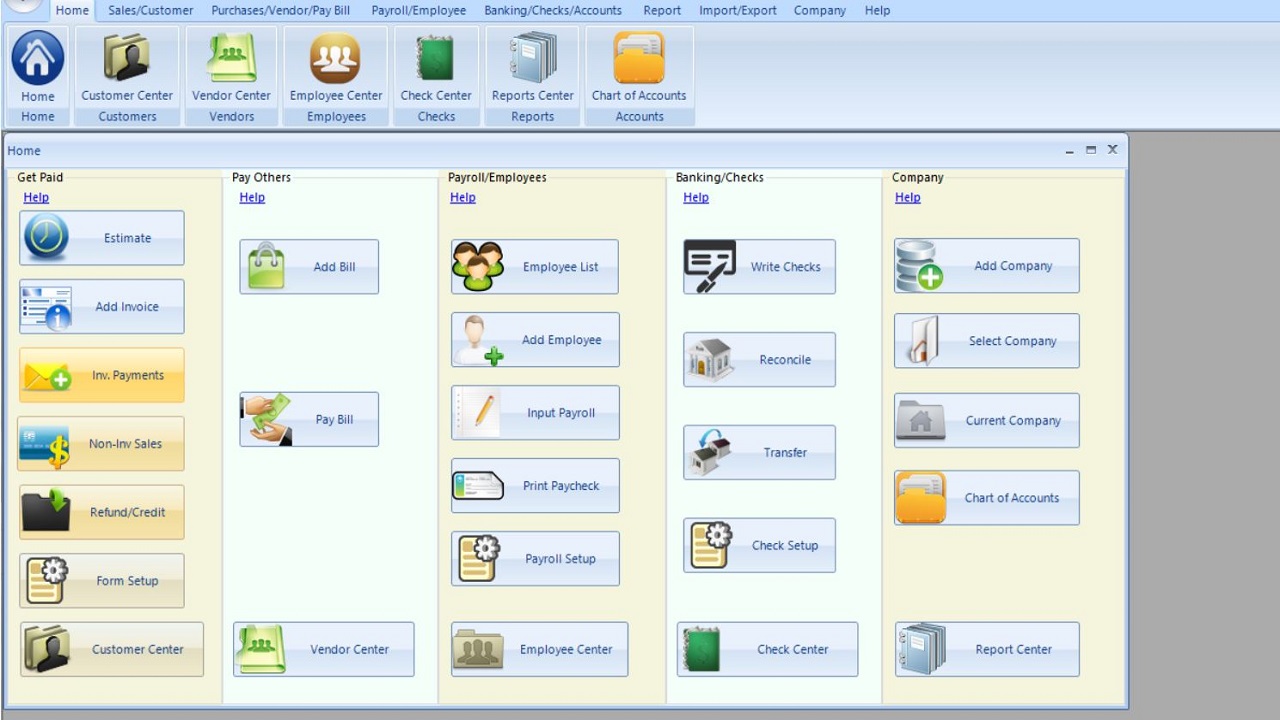
Halfpricesoft has launched ezAccounting 3.16.18, an affordable accounting and payroll software specifically designed for small businesses using Windows. This software aims to assist users in tracking their income and expenses, managing invoicing and payments, processing payroll, printing checks, and generating essential tax forms—all without the burden of monthly subscription fees. Users can explore the software through a 30-day free trial, allowing them to experience its features without any commitment.
User Experience and Features
ezAccounting is characterized by its user-friendly button-style interface that covers essential accounting functions such as income tracking, expense management, invoicing, payroll handling, check printing, and tax form generation. While the layout may take some time to get accustomed to, many users find it logical and easy to navigate after initial use.
The software's most notable advantage is its local desktop nature, which eliminates dependency on cloud services and subscription pressures. Users purchase the software outright, with the option to pay for updates later without any forced upgrades or unexpected costs. This stands in contrast to competitors like QuickBooks, which can incur high monthly fees and unexpected charges for upgrades and additional users.
Key Functionalities
ezAccounting excels in simplifying income and expense tracking, with easy access to invoices, receipts, estimates, and purchase orders. Its payroll processing capabilities are robust, allowing in-house payroll management, check printing, and support for essential tax forms including 941, 940, W-2, and W-3. The software also provides solid tax tables and job tracking features that tie labor and costs to specific projects. Reports generated cover essential metrics for small businesses, including profit and loss statements, balance sheets, sales reports, and payroll insights.
While ezAccounting is effective for many users, it does have limitations. It is Windows-only, which may restrict its user base. Additionally, integration options are limited, and some tax forms may necessitate preprinted paper. Users migrating from QuickBooks may face challenges due to limited import capabilities for financial data.
Ideal Users and Alternatives
ezAccounting is best suited for businesses seeking local control, built-in payroll functionality, job tracking, and predictable pricing structures. Its ease of use makes it an attractive alternative to cloud-based accounting tools, particularly for companies that prioritize payroll and job costing.
However, it may not be the right fit for every business. Companies looking for extensive integrations or those who prefer cloud-based solutions might want to explore alternatives like GnuCash for a more traditional accounting experience.
Final Verdict
In summary, ezAccounting 3.16.18 is a niche yet valuable option for businesses that require payroll processing, job tracking, check printing, and straightforward reporting without the hassle of subscriptions. The flat pricing model, combined with local data control, presents significant advantages for users frustrated by subscription-based accounting solutions. For those interested in exploring its potential, the free trial offers a risk-free opportunity to determine if ezAccounting aligns with their business needs. For further support and discussions on alternatives, users can visit the MajorGeeks forums.
Future Extensions
As software continues to evolve, ezAccounting could benefit from enhancing its integration capabilities with other financial tools and platforms, expanding its user base beyond Windows, and possibly exploring cloud solutions to cater to a broader audience. Additionally, incorporating more advanced features for larger enterprises could help it compete more effectively with established players like QuickBooks while maintaining its affordability and user-friendly approach
User Experience and Features
ezAccounting is characterized by its user-friendly button-style interface that covers essential accounting functions such as income tracking, expense management, invoicing, payroll handling, check printing, and tax form generation. While the layout may take some time to get accustomed to, many users find it logical and easy to navigate after initial use.
The software's most notable advantage is its local desktop nature, which eliminates dependency on cloud services and subscription pressures. Users purchase the software outright, with the option to pay for updates later without any forced upgrades or unexpected costs. This stands in contrast to competitors like QuickBooks, which can incur high monthly fees and unexpected charges for upgrades and additional users.
Key Functionalities
ezAccounting excels in simplifying income and expense tracking, with easy access to invoices, receipts, estimates, and purchase orders. Its payroll processing capabilities are robust, allowing in-house payroll management, check printing, and support for essential tax forms including 941, 940, W-2, and W-3. The software also provides solid tax tables and job tracking features that tie labor and costs to specific projects. Reports generated cover essential metrics for small businesses, including profit and loss statements, balance sheets, sales reports, and payroll insights.
While ezAccounting is effective for many users, it does have limitations. It is Windows-only, which may restrict its user base. Additionally, integration options are limited, and some tax forms may necessitate preprinted paper. Users migrating from QuickBooks may face challenges due to limited import capabilities for financial data.
Ideal Users and Alternatives
ezAccounting is best suited for businesses seeking local control, built-in payroll functionality, job tracking, and predictable pricing structures. Its ease of use makes it an attractive alternative to cloud-based accounting tools, particularly for companies that prioritize payroll and job costing.
However, it may not be the right fit for every business. Companies looking for extensive integrations or those who prefer cloud-based solutions might want to explore alternatives like GnuCash for a more traditional accounting experience.
Final Verdict
In summary, ezAccounting 3.16.18 is a niche yet valuable option for businesses that require payroll processing, job tracking, check printing, and straightforward reporting without the hassle of subscriptions. The flat pricing model, combined with local data control, presents significant advantages for users frustrated by subscription-based accounting solutions. For those interested in exploring its potential, the free trial offers a risk-free opportunity to determine if ezAccounting aligns with their business needs. For further support and discussions on alternatives, users can visit the MajorGeeks forums.
Future Extensions
As software continues to evolve, ezAccounting could benefit from enhancing its integration capabilities with other financial tools and platforms, expanding its user base beyond Windows, and possibly exploring cloud solutions to cater to a broader audience. Additionally, incorporating more advanced features for larger enterprises could help it compete more effectively with established players like QuickBooks while maintaining its affordability and user-friendly approach
ezAccounting 3.16.18 released
ezAccounting is affordable small-business accounting and payroll software for Windows that helps you track income and expenses, manage invoicing and payments, process payroll, print checks, and generate essential tax forms, with a 30-day free trial.