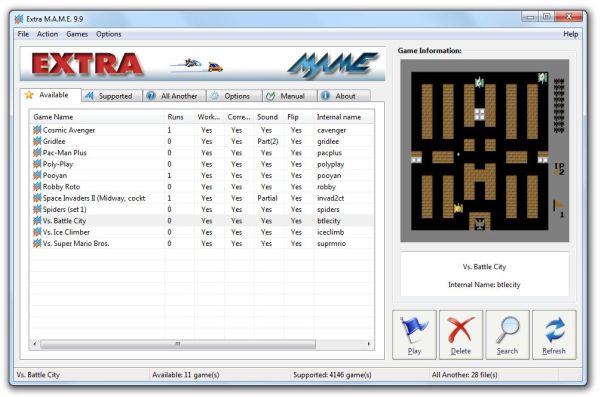
ExtraMAME has officially released version 26.4, enhancing the experience of playing classic arcade games on your computer. This software acts as a graphical user interface (GUI) for M.A.M.E. (Multiple Arcade Machine Emulator), enabling users to access a vast library of retro games.
To get started with ExtraMAME, follow these steps:
1. Download the latest version of the Windows command line binaries for M.A.M.E. from the specified link.
2. Install ExtraMAME in a directory of your choice, with the default being C:\Games\ExtraMAME.
3. Place the "Windows command-line binaries of MAME" into the folder you created.
4. Launch ExtraMAME.
Once installed, ExtraMAME presents two lists: the "supported" list, which includes games compatible with M.A.M.E., and the "available" list, which showcases the games currently installed on your system. Initially, the available list will be empty, as you'll need to download specific M.A.M.E. game files, including "bios" and "ROM" files.
In addition to these features, ExtraMAME 26.4 may include improvements in performance, bug fixes, and new game compatibility options, making it an essential tool for retro gaming enthusiasts. As the gaming community continues to grow, users are encouraged to share their experiences and favorite game titles, which can help guide future updates and enhancements to the software. Don't miss out on the chance to relive your childhood memories or discover classic games you may have missed
To get started with ExtraMAME, follow these steps:
1. Download the latest version of the Windows command line binaries for M.A.M.E. from the specified link.
2. Install ExtraMAME in a directory of your choice, with the default being C:\Games\ExtraMAME.
3. Place the "Windows command-line binaries of MAME" into the folder you created.
4. Launch ExtraMAME.
Once installed, ExtraMAME presents two lists: the "supported" list, which includes games compatible with M.A.M.E., and the "available" list, which showcases the games currently installed on your system. Initially, the available list will be empty, as you'll need to download specific M.A.M.E. game files, including "bios" and "ROM" files.
In addition to these features, ExtraMAME 26.4 may include improvements in performance, bug fixes, and new game compatibility options, making it an essential tool for retro gaming enthusiasts. As the gaming community continues to grow, users are encouraged to share their experiences and favorite game titles, which can help guide future updates and enhancements to the software. Don't miss out on the chance to relive your childhood memories or discover classic games you may have missed
ExtraMAME 26.4 released
ExtraMAME is a GUI wrapper for M.A.M.E., the Multiple Arcade Machine Emulator that allows you to play thousands of old-school arcade games on your computer.