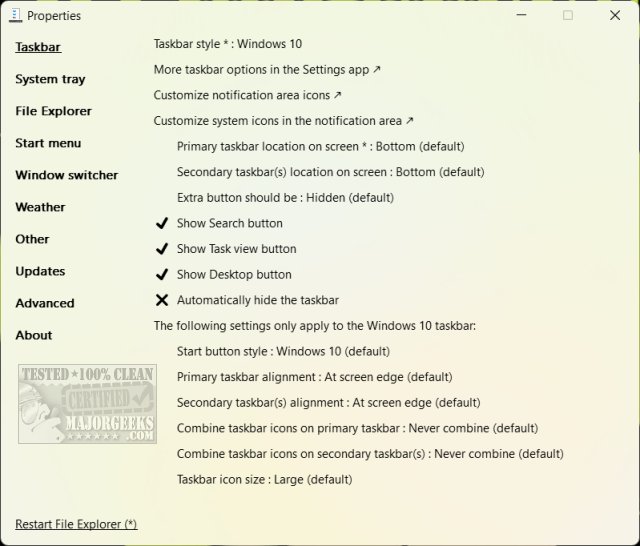
ExplorerPatcher has released two pre-release versions, 26100.8457.70.2 and 26100.4946.69.6, providing users with an open-source tool to customize various aspects of Windows 11's interface, including the Start Menu, Taskbar, System Tray, and File Explorer. This utility aims to address the dissatisfaction among Windows users regarding the significant UI changes introduced in Windows 11, allowing them to revert to familiar Windows 10 features or adjust the current setup to their preferences.
- Start Menu Customization: Users can choose between Windows 10 and 11 styles, disable unwanted "Recommended" tiles, and set the Start Menu to open directly to the apps list.
- Taskbar Adjustments: Options include resizing the Taskbar and restoring Windows 10 functionalities, providing more flexibility than the default Windows 11 settings.
- System Tray Options: Users can revert to the classic Windows 10 tray icons and adjust notification settings to their liking.
- File Explorer Enhancements: Features like disabling modern search and customizing the right-click context menu are available for a more streamlined user experience.
- Window Management Tweaks: Customization options for multitasking, such as modifying Alt + Tab behavior and improving multi-monitor support.
- Weather Widget Customization: Adjust the appearance and functionality of the weather widget on the Taskbar.
- Advanced Settings: For advanced users, there are experimental features available, although caution is advised regarding their use.
ExplorerPatcher stands out due to its lightweight nature and lack of unnecessary bloatware. Installation is straightforward, requiring merely the placement of the executable file without complex setup procedures. Its user-friendly interface allows for easy access to various configuration options through a simple right-click, making it accessible even for those who may not be tech-savvy.
- Increased Efficiency: Users can quickly access familiar functions without adapting to the new UI, reducing frustration and saving time.
- Consistency: The tool restores a familiar Windows environment, making it more comfortable for long-time users.
- User Control: Unlike Windows' default settings, ExplorerPatcher empowers users to modify their interface as they see fit.
- Performance: The utility operates smoothly without consuming excessive system resources.
ExplorerPatcher is particularly beneficial for dedicated Windows users who may find the transition to Windows 11 challenging. While not explicitly tailored for beginners, its accessible features and thorough documentation make it manageable for those willing to explore customization.
In summary, ExplorerPatcher is a robust and practical solution for users looking to enhance their Windows 11 experience or revert to familiar Windows 10 features. Its simplicity, versatility, and open-source nature make it an essential tool for anyone interested in personalizing their PC interface. Whether you're seeking to boost productivity or simply prefer a more traditional Windows look, ExplorerPatcher is worth considering for your customization toolkit
Key Features of ExplorerPatcher
- Start Menu Customization: Users can choose between Windows 10 and 11 styles, disable unwanted "Recommended" tiles, and set the Start Menu to open directly to the apps list.
- Taskbar Adjustments: Options include resizing the Taskbar and restoring Windows 10 functionalities, providing more flexibility than the default Windows 11 settings.
- System Tray Options: Users can revert to the classic Windows 10 tray icons and adjust notification settings to their liking.
- File Explorer Enhancements: Features like disabling modern search and customizing the right-click context menu are available for a more streamlined user experience.
- Window Management Tweaks: Customization options for multitasking, such as modifying Alt + Tab behavior and improving multi-monitor support.
- Weather Widget Customization: Adjust the appearance and functionality of the weather widget on the Taskbar.
- Advanced Settings: For advanced users, there are experimental features available, although caution is advised regarding their use.
Why Choose ExplorerPatcher?
ExplorerPatcher stands out due to its lightweight nature and lack of unnecessary bloatware. Installation is straightforward, requiring merely the placement of the executable file without complex setup procedures. Its user-friendly interface allows for easy access to various configuration options through a simple right-click, making it accessible even for those who may not be tech-savvy.
Daily Benefits of Using ExplorerPatcher
- Increased Efficiency: Users can quickly access familiar functions without adapting to the new UI, reducing frustration and saving time.
- Consistency: The tool restores a familiar Windows environment, making it more comfortable for long-time users.
- User Control: Unlike Windows' default settings, ExplorerPatcher empowers users to modify their interface as they see fit.
- Performance: The utility operates smoothly without consuming excessive system resources.
Ideal for Windows Veterans
ExplorerPatcher is particularly beneficial for dedicated Windows users who may find the transition to Windows 11 challenging. While not explicitly tailored for beginners, its accessible features and thorough documentation make it manageable for those willing to explore customization.
Conclusion
In summary, ExplorerPatcher is a robust and practical solution for users looking to enhance their Windows 11 experience or revert to familiar Windows 10 features. Its simplicity, versatility, and open-source nature make it an essential tool for anyone interested in personalizing their PC interface. Whether you're seeking to boost productivity or simply prefer a more traditional Windows look, ExplorerPatcher is worth considering for your customization toolkit
ExplorerPatcher 26100.8457.70.2 Pre-Release / 26100.4946.69.6 released
ExplorerPatcher is an Open Source, portable executable that lets you customize the Windows 11 Start Menu, Taskbar, System Tray, File Explorer, and more.
ExplorerPatcher 26100.8457.70.2 Pre-Release / 26100.4946.69.6 released @ MajorGeeks