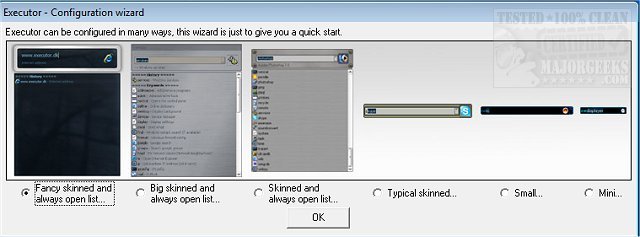
Executor version 2.3.6 has been released, offering users a highly customizable alternative to the traditional Windows Run feature. This multi-purpose launcher is designed to enhance productivity by allowing users to quickly access programs without the hassle of scrolling through extensive Start menu lists.
Executor simplifies the process of launching applications by providing a streamlined interface that can be personalized with various skins, layouts, and operation modes. Users can set it up to display keyword-based suggestions, making it easy to find and launch programs quickly. The app features real-time search capabilities, filtering results as users type, and enabling a simple double-click to open applications, access the Windows context menu, or copy file paths.
In addition to its core functionalities, Executor includes several advanced features:
- Users can assign properties to keywords, allowing for easy drag-and-drop of shortcuts or files to create new keywords.
- The program supports auto-completion for keywords, file systems, and history, enhancing the search experience.
- Users can directly enter URLs, enabling quick access to websites.
- Keywords can accept parameters, allowing for more specific searches.
- Executor can dynamically add matching Start menu and Control Panel items to the suggestion list.
- Users can define custom paths for scanning specific file extensions.
- Integration with popular services like Gmail and Twitter is possible, further expanding its utility.
Executor also allows extensive customization of its layout, including color, font, dimensions, and transparency, making it adaptable to individual preferences. Each keyword can be assigned a hotkey, and the program can be launched using user-defined shortcuts.
In summary, Executor 2.3.6 is a powerful tool for users looking to improve their workflow and access applications more efficiently. With its extensive features and customization options, it stands out as a versatile launcher suited to various user needs. For a complete list of features, users are encouraged to visit the author’s website
Executor simplifies the process of launching applications by providing a streamlined interface that can be personalized with various skins, layouts, and operation modes. Users can set it up to display keyword-based suggestions, making it easy to find and launch programs quickly. The app features real-time search capabilities, filtering results as users type, and enabling a simple double-click to open applications, access the Windows context menu, or copy file paths.
In addition to its core functionalities, Executor includes several advanced features:
- Users can assign properties to keywords, allowing for easy drag-and-drop of shortcuts or files to create new keywords.
- The program supports auto-completion for keywords, file systems, and history, enhancing the search experience.
- Users can directly enter URLs, enabling quick access to websites.
- Keywords can accept parameters, allowing for more specific searches.
- Executor can dynamically add matching Start menu and Control Panel items to the suggestion list.
- Users can define custom paths for scanning specific file extensions.
- Integration with popular services like Gmail and Twitter is possible, further expanding its utility.
Executor also allows extensive customization of its layout, including color, font, dimensions, and transparency, making it adaptable to individual preferences. Each keyword can be assigned a hotkey, and the program can be launched using user-defined shortcuts.
In summary, Executor 2.3.6 is a powerful tool for users looking to improve their workflow and access applications more efficiently. With its extensive features and customization options, it stands out as a versatile launcher suited to various user needs. For a complete list of features, users are encouraged to visit the author’s website
Executor 2.3.6 released
Executor provides a fully customizable alternative to Windows Run that gives you a personalized multi-purpose launcher and more.