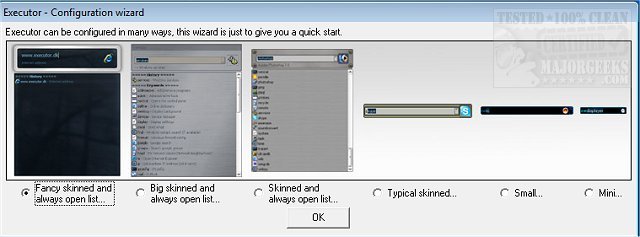
Executor 2.3.3 has been released, offering users a highly customizable alternative to the traditional Windows Run feature. This application serves as a multi-purpose launcher designed to streamline the process of searching for programs, particularly benefiting those with extensive Start menus. By facilitating quick access to applications, Executor optimizes daily workflows and reduces the time spent scrolling through numerous programs.
The software allows for extensive personalization, including various skins, layouts, and operation modes. Users can configure it to display keyword-based suggestions and filter results dynamically as they type. A simple double-click launches the desired application, accesses the Windows context menu, or performs other actions like copying file paths. When not in use, Executor conveniently resides in the system tray for rapid access.
Key features of Executor include:
- The ability to create keywords linked to shortcuts, enabling users to easily add files, folders, and favorites.
- Auto-completion for keywords and history, enhancing efficiency.
- Direct URL detection, allowing users to enter web addresses seamlessly.
- Support for parameters in keywords to refine searches.
- Integration of matching Start menu and control panel items into drop-down lists.
- User-defined paths for custom file extensions.
- Compatibility with popular services like Gmail and Twitter, among others.
- Customizable layouts for colors, fonts, dimensions, and transparency.
- Skin support and options for free positioning of elements.
- Functionality to assign hotkeys to keywords, akin to hotkey managers.
This release not only addresses the needs of users looking to improve their productivity but also offers a range of settings for tailored usage. As technology continues to evolve, tools like Executor become essential for enhancing efficiency in everyday tasks.
In addition to its main features, Executor 2.3.3 can be a valuable resource for users looking to optimize their use of the Windows environment. By providing comprehensive customization options, it appeals to a wide range of users, from casual computer users seeking ease of access to power users who require advanced functionalities. Furthermore, as more applications integrate with Executor, it stands to increase its utility by providing even more shortcuts and streamlined access to various services, thereby enhancing overall user experience
The software allows for extensive personalization, including various skins, layouts, and operation modes. Users can configure it to display keyword-based suggestions and filter results dynamically as they type. A simple double-click launches the desired application, accesses the Windows context menu, or performs other actions like copying file paths. When not in use, Executor conveniently resides in the system tray for rapid access.
Key features of Executor include:
- The ability to create keywords linked to shortcuts, enabling users to easily add files, folders, and favorites.
- Auto-completion for keywords and history, enhancing efficiency.
- Direct URL detection, allowing users to enter web addresses seamlessly.
- Support for parameters in keywords to refine searches.
- Integration of matching Start menu and control panel items into drop-down lists.
- User-defined paths for custom file extensions.
- Compatibility with popular services like Gmail and Twitter, among others.
- Customizable layouts for colors, fonts, dimensions, and transparency.
- Skin support and options for free positioning of elements.
- Functionality to assign hotkeys to keywords, akin to hotkey managers.
This release not only addresses the needs of users looking to improve their productivity but also offers a range of settings for tailored usage. As technology continues to evolve, tools like Executor become essential for enhancing efficiency in everyday tasks.
In addition to its main features, Executor 2.3.3 can be a valuable resource for users looking to optimize their use of the Windows environment. By providing comprehensive customization options, it appeals to a wide range of users, from casual computer users seeking ease of access to power users who require advanced functionalities. Furthermore, as more applications integrate with Executor, it stands to increase its utility by providing even more shortcuts and streamlined access to various services, thereby enhancing overall user experience
Executor 2.3.3 released
Executor provides a fully customizable alternative to Windows Run that gives you a personalized multi-purpose launcher and more.