Executor 2.3.10 has been released, offering users a highly customizable alternative to the traditional Windows Run feature. This multi-purpose launcher is designed to enhance productivity by providing a quicker and more efficient way to access applications, especially for those who find navigating a cluttered Start menu time-consuming.
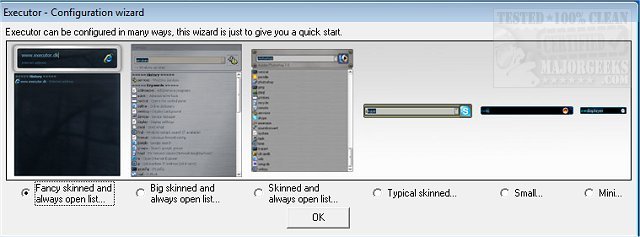
One of the standout features of Executor is its ability to be tailored to individual preferences through various skins, layouts, and operation modes. Users can configure it to display keyword-based suggestions and filter results in real time as they type, making it easy to launch programs or access folders with just a double-click. When not in use, Executor conveniently resides in the system tray for quick access.
Some key features of Executor include:
- The capability to assign properties to keywords, allowing users to drag and drop shortcuts, files, and folders directly into the application.
- Auto-completion for keywords, file systems, and user history, enhancing the speed of searches.
- URL detection, enabling users to input web addresses directly.
- Integration with popular services such as Gmail and Twitter, providing seamless access to frequently used applications.
- Customizable layout options to adjust colors, fonts, dimensions, and transparency.
- The ability to assign hotkeys to keywords, functioning similarly to hotkey managers.
With its extensive configuration options, Executor can significantly streamline daily workflows, making it a valuable tool for anyone looking to optimize their work environment.
To further extend its functionality, users can explore additional features such as the ability to add user-defined file extensions and the option to incorporate Windows Instant Search functionality. The community forums provide resources for tutorials and tips, helping users maximize the benefits of this versatile application.
In summary, Executor 2.3.10 is a powerful tool that enhances productivity by simplifying application launching and customizes user experience, making it an essential asset for anyone looking to improve their workflow efficiency
One of the standout features of Executor is its ability to be tailored to individual preferences through various skins, layouts, and operation modes. Users can configure it to display keyword-based suggestions and filter results in real time as they type, making it easy to launch programs or access folders with just a double-click. When not in use, Executor conveniently resides in the system tray for quick access.
Some key features of Executor include:
- The capability to assign properties to keywords, allowing users to drag and drop shortcuts, files, and folders directly into the application.
- Auto-completion for keywords, file systems, and user history, enhancing the speed of searches.
- URL detection, enabling users to input web addresses directly.
- Integration with popular services such as Gmail and Twitter, providing seamless access to frequently used applications.
- Customizable layout options to adjust colors, fonts, dimensions, and transparency.
- The ability to assign hotkeys to keywords, functioning similarly to hotkey managers.
With its extensive configuration options, Executor can significantly streamline daily workflows, making it a valuable tool for anyone looking to optimize their work environment.
To further extend its functionality, users can explore additional features such as the ability to add user-defined file extensions and the option to incorporate Windows Instant Search functionality. The community forums provide resources for tutorials and tips, helping users maximize the benefits of this versatile application.
In summary, Executor 2.3.10 is a powerful tool that enhances productivity by simplifying application launching and customizes user experience, making it an essential asset for anyone looking to improve their workflow efficiency
Executor 2.3.10 released
Executor provides a fully customizable alternative to Windows Run that gives you a personalized multi-purpose launcher and more.