ET Optimizer has released version 6.11.00 of its software, formerly known as ET All-in-One Optimization Script. This application offers a user-friendly, one-click solution for optimizing performance, enhancing privacy, and removing unnecessary bloatware from Windows operating systems. Currently, ET Optimizer is compatible with Windows 10 Home 23H2, Windows 11 Enterprise 23H2, and has partial support for Windows 8.1 Build 9600.
The software includes an extensive range of features, such as the removal of various pre-installed applications like Microsoft 3D Viewer, Microsoft Power BI for Windows, Xbox App, and others. Users can also disable superfluous startup applications. For those interested in a detailed list of all the functionalities available, the author's repository provides a comprehensive breakdown.
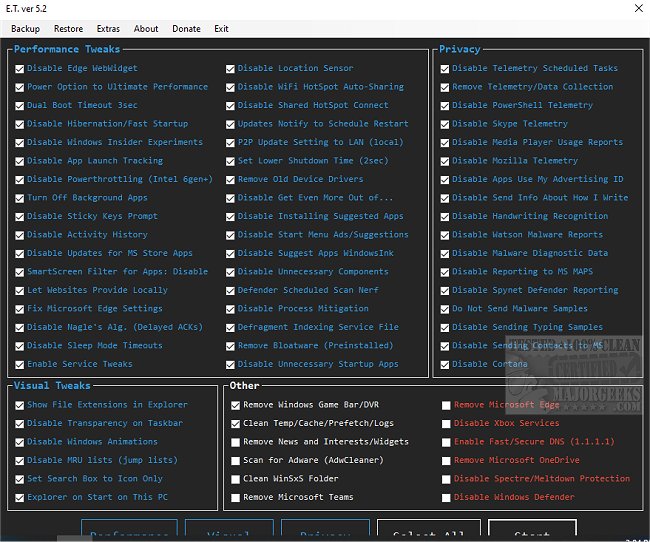
The interface of ET Optimizer is intuitive, dividing options into categories: Performance Tweaks, Visual Tweaks, Privacy, and Other. All features are checked by default, allowing users to easily customize their selections. Backup and restore functionalities are readily accessible, and it is highly recommended to use these features to mitigate potential issues. Additionally, users can access extra tools such as Msconfig, Cleanmgr, UAC Settings, and Event Viewer directly from the app.
Despite its many advantages, some users have reported difficulties in extracting the latest version, even when the correct password is used. For those encountering this issue, it is suggested to utilize WinRAR for a successful extraction.
In conclusion, ET Optimizer 6.11.00 is a powerful tool for users looking to streamline and enhance their Windows experience through an easy-to-navigate process. As technology advances, future updates may include additional features and support for newer Windows versions, making it a valuable utility for both casual and advanced users
The software includes an extensive range of features, such as the removal of various pre-installed applications like Microsoft 3D Viewer, Microsoft Power BI for Windows, Xbox App, and others. Users can also disable superfluous startup applications. For those interested in a detailed list of all the functionalities available, the author's repository provides a comprehensive breakdown.
The interface of ET Optimizer is intuitive, dividing options into categories: Performance Tweaks, Visual Tweaks, Privacy, and Other. All features are checked by default, allowing users to easily customize their selections. Backup and restore functionalities are readily accessible, and it is highly recommended to use these features to mitigate potential issues. Additionally, users can access extra tools such as Msconfig, Cleanmgr, UAC Settings, and Event Viewer directly from the app.
Despite its many advantages, some users have reported difficulties in extracting the latest version, even when the correct password is used. For those encountering this issue, it is suggested to utilize WinRAR for a successful extraction.
In conclusion, ET Optimizer 6.11.00 is a powerful tool for users looking to streamline and enhance their Windows experience through an easy-to-navigate process. As technology advances, future updates may include additional features and support for newer Windows versions, making it a valuable utility for both casual and advanced users
ET Optimizer 6.11.00 released
ET Optimizer (formerly ET All-in-One Optimization Script) provides a one-click option for performance optimization, privacy fixes, and bloatware removal.