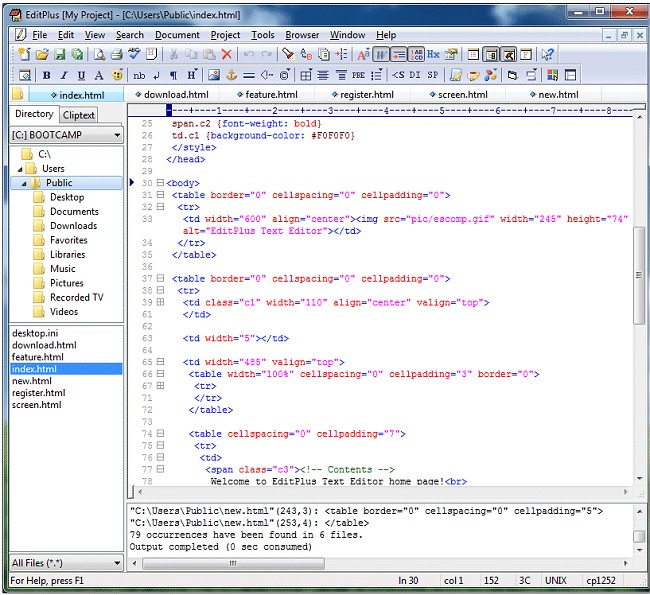
EditPlus Text Editor 6.1.0939 has been released, enhancing the functionality of this versatile tool designed for Windows users. As an Internet-ready text editor, it serves as a robust alternative to Notepad, particularly for programmers and web developers. The latest version offers advanced features such as syntax highlighting for a range of programming languages, including HTML, CSS, PHP, ASP, Perl, C/C++, Java, JavaScript, and VBScript. Additionally, users can easily extend the editor's capabilities by creating custom syntax files for other languages.
One of the standout features of EditPlus is its integrated web browser, which allows users to preview HTML pages seamlessly. The inclusion of FTP commands enables straightforward uploading of local files to an FTP server, making it a practical choice for web developers. Furthermore, EditPlus provides a variety of useful tools such as an HTML toolbar, user-defined tools, line numbering, a ruler for layout assistance, auto-completion for coding efficiency, clip text functionality for managing snippets, URL highlighting, column selection, and a powerful search and replace mechanism.
The editor also supports multiple undo/redo actions, a spell checker for error-free writing, and customizable keyboard shortcuts, enhancing user experience and productivity. With these features, EditPlus continues to be a powerful tool for both novice and experienced users looking to streamline their coding and web development tasks.
In addition to the existing features, future updates could focus on improving collaboration tools, such as real-time editing with multiple users or enhanced version control integration, which would greatly benefit software development teams. Expanding support for additional languages and frameworks, as well as incorporating machine learning capabilities for code suggestions, could further position EditPlus as a leading text editor in the competitive landscape of programming tools
One of the standout features of EditPlus is its integrated web browser, which allows users to preview HTML pages seamlessly. The inclusion of FTP commands enables straightforward uploading of local files to an FTP server, making it a practical choice for web developers. Furthermore, EditPlus provides a variety of useful tools such as an HTML toolbar, user-defined tools, line numbering, a ruler for layout assistance, auto-completion for coding efficiency, clip text functionality for managing snippets, URL highlighting, column selection, and a powerful search and replace mechanism.
The editor also supports multiple undo/redo actions, a spell checker for error-free writing, and customizable keyboard shortcuts, enhancing user experience and productivity. With these features, EditPlus continues to be a powerful tool for both novice and experienced users looking to streamline their coding and web development tasks.
In addition to the existing features, future updates could focus on improving collaboration tools, such as real-time editing with multiple users or enhanced version control integration, which would greatly benefit software development teams. Expanding support for additional languages and frameworks, as well as incorporating machine learning capabilities for code suggestions, could further position EditPlus as a leading text editor in the competitive landscape of programming tools
EditPlus Text Editor 6.1.0939 released
EditPlus Text Editor is an Internet-ready text editor, HTML editor and programmers editor for Windows.