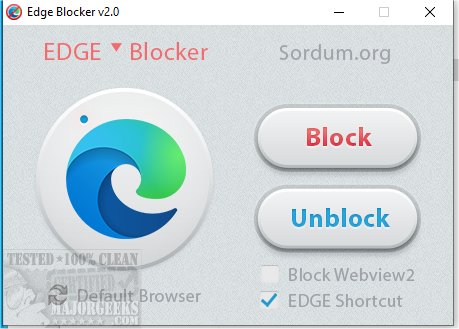
Edge Blocker 2.1 has been released, enabling users to effortlessly block or unblock Microsoft Edge at their convenience. As a core component of the Windows 10 and 11 operating systems, Microsoft Edge is recognized by Microsoft as a trusted user interface application, often set as the default browser and PDF reader. Users may choose to block Edge for various reasons, such as using a restricted account or preferring to avoid being limited to Edge for web browsing or PDF reading.
Edge Blocker serves as a straightforward solution for those looking to control access to Microsoft Edge. The application is portable; users can simply double-click the executable file and select to either block or unblock the browser. This flexibility means that whether users want to make a change daily or after a year, they can easily do so by rerunning Edge Blocker and selecting the option to unblock.
In addition to its primary function, Edge Blocker is part of a broader ecosystem of tools that enhance user experience with Microsoft Edge. Similar applications and guides can help users manage passwords, payment information, and addresses within Edge, configure tracking prevention settings, clear browsing data upon closure, and change the default search engine.
With this update, Edge Blocker not only simplifies the management of Microsoft Edge but also empowers users with greater control over their browsing experience, aligning with the growing demand for customizable software solutions in a digital landscape increasingly dominated by integrated applications
Edge Blocker serves as a straightforward solution for those looking to control access to Microsoft Edge. The application is portable; users can simply double-click the executable file and select to either block or unblock the browser. This flexibility means that whether users want to make a change daily or after a year, they can easily do so by rerunning Edge Blocker and selecting the option to unblock.
In addition to its primary function, Edge Blocker is part of a broader ecosystem of tools that enhance user experience with Microsoft Edge. Similar applications and guides can help users manage passwords, payment information, and addresses within Edge, configure tracking prevention settings, clear browsing data upon closure, and change the default search engine.
With this update, Edge Blocker not only simplifies the management of Microsoft Edge but also empowers users with greater control over their browsing experience, aligning with the growing demand for customizable software solutions in a digital landscape increasingly dominated by integrated applications
Edge Blocker 2.1 released
Edge Blocker allows you to easily block or unblock Microsoft Edge as often as you like.