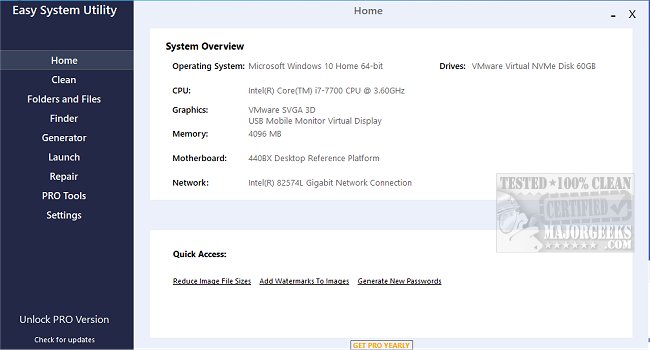
The latest version of Easy System Utility (ESU) offers a user-friendly interface designed to optimize your computer's performance by helping you manage unnecessary files and streamline various tasks. This tool not only facilitates file management but also provides a comprehensive overview of your computer's hardware specifications, including details about your operating system, CPU, GPU, memory, motherboard, network, and drivers—all accessible in one convenient location.
The interface is organized into several tabs, each housing specific functions. The Clean tab enables users to identify and remove unneeded Windows software and junk files, such as DirectX Shader Cache, Recycle Bin contents, Temp files, and more, ultimately helping to free up valuable disk space.
In the Folders/Files tab, users can unlock files and folders that may have permission issues, compress image sizes, add watermarks, rename folders, and delete large folders that occupy excessive space. This ensures efficient file management and optimization of storage.
Additionally, ESU includes a Password Generator tab, where users can create secure passwords with customizable lengths and character types, enhancing security measures for their accounts. The Launch tab allows for quick access to frequently used programs, files, and folders directly from the ESU system tray icon, eliminating the need for tedious searching.
It's essential to run Easy System Utility with administrator rights to ensure full functionality of all features.
Key Features of Easy System Utility:
- View System Specifications
- Analyze and Clean Windows Junk Files
- Unlock Files/Folders
- Reduce Image File Sizes and Add Watermarks
- Rename Files/Folders and Delete Large Folders
- Find Windows Key and WiFi Passwords
- Generate Random Passwords
- Quick Launch for Files/Programs
Similar Tools:
- CCleaner, Wise Disk Cleaner, and PrivaZer for disk cleaning.
- Storage Sense for automated junk file deletion in Windows 10.
- Registry backup and restoration guides for Windows 10 & 11.
- Methods to manage startup applications effectively.
Conclusion:
With the release of Easy System Utility 1.1.57.0, users gain a powerful tool for optimizing their systems, managing files, and enhancing security. Its comprehensive features and intuitive interface make it an essential addition to any computer user's toolkit. Whether you are looking to free up space, manage passwords, or streamline access to your frequently used files, ESU has you covered
The interface is organized into several tabs, each housing specific functions. The Clean tab enables users to identify and remove unneeded Windows software and junk files, such as DirectX Shader Cache, Recycle Bin contents, Temp files, and more, ultimately helping to free up valuable disk space.
In the Folders/Files tab, users can unlock files and folders that may have permission issues, compress image sizes, add watermarks, rename folders, and delete large folders that occupy excessive space. This ensures efficient file management and optimization of storage.
Additionally, ESU includes a Password Generator tab, where users can create secure passwords with customizable lengths and character types, enhancing security measures for their accounts. The Launch tab allows for quick access to frequently used programs, files, and folders directly from the ESU system tray icon, eliminating the need for tedious searching.
It's essential to run Easy System Utility with administrator rights to ensure full functionality of all features.
Key Features of Easy System Utility:
- View System Specifications
- Analyze and Clean Windows Junk Files
- Unlock Files/Folders
- Reduce Image File Sizes and Add Watermarks
- Rename Files/Folders and Delete Large Folders
- Find Windows Key and WiFi Passwords
- Generate Random Passwords
- Quick Launch for Files/Programs
Similar Tools:
- CCleaner, Wise Disk Cleaner, and PrivaZer for disk cleaning.
- Storage Sense for automated junk file deletion in Windows 10.
- Registry backup and restoration guides for Windows 10 & 11.
- Methods to manage startup applications effectively.
Conclusion:
With the release of Easy System Utility 1.1.57.0, users gain a powerful tool for optimizing their systems, managing files, and enhancing security. Its comprehensive features and intuitive interface make it an essential addition to any computer user's toolkit. Whether you are looking to free up space, manage passwords, or streamline access to your frequently used files, ESU has you covered
Easy System Utility 1.1.57.0 released
Easy System Utility provides an intuitive interface for removing unnecessary files, unlocking folders, compressing images, adding watermarks, launching files and folders from the system tray, and more.