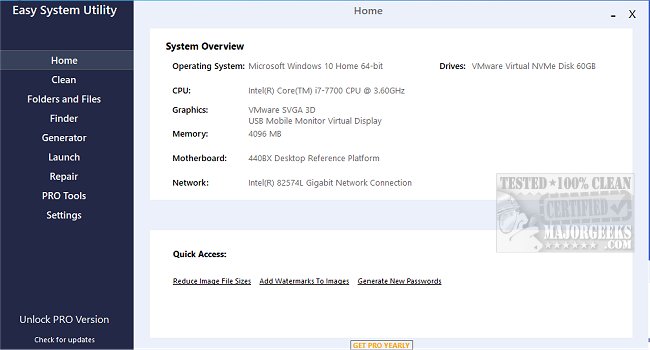
Easy System Utility 1.1.56.0 has recently been released, showcasing an array of features designed to optimize computer performance and organization. This user-friendly tool simplifies the process of managing system files and enhancing system functionality.
The utility provides a comprehensive system overview, allowing users to easily access essential hardware specifications such as operating system details, CPU and GPU models, memory information, motherboard data, and network settings. This centralized information not only saves time but also aids in troubleshooting and system management.
The interface is neatly structured into tabs for intuitive navigation. The Clean tab enables users to identify and delete unnecessary Windows software and junk files, including DirectX Shader Cache, Prefetch Files, and Temp files, thus freeing up valuable disk space. The Folders/Files tab offers functionalities such as unlocking files and folders with permission issues, compressing images, adding watermarks, renaming folders, and deleting large folders that consume significant storage.
Moreover, the Password Generator feature allows users to create secure, randomized passwords with customizable lengths and character sets, enhancing security across applications. The Launch tab provides quick access to frequently used files and programs directly from the system tray, streamlining workflow and improving efficiency.
To fully utilize all features, users must run Easy System Utility with administrator rights.
Key Features of Easy System Utility:
- View System Specifications
- Analyze and Clean Windows Junk Files
- Unlock Files and Folders
- Reduce Image File Sizes
- Add Watermarks to Images
- Rename and Delete Large Folders
- Generate Random Passwords
- Quick Launch for Files and Programs
In addition to these features, users may find it beneficial to explore similar tools such as CCleaner, Wise Disk Cleaner, and PrivaZer for drive cleaning, or methods to manage Windows Registry and startup applications effectively.
Extended Considerations:
As technology continues to evolve, maintaining system performance becomes increasingly critical. Easy System Utility not only addresses immediate needs by cleaning and optimizing system resources but also promotes long-term health of the computer through proactive management. Users should regularly update their software for the best performance and security, and consider integrating additional tools that provide complementary functionalities, such as backup solutions and virus protection. By embracing a comprehensive approach to system maintenance, users can ensure their devices operate smoothly and efficiently
The utility provides a comprehensive system overview, allowing users to easily access essential hardware specifications such as operating system details, CPU and GPU models, memory information, motherboard data, and network settings. This centralized information not only saves time but also aids in troubleshooting and system management.
The interface is neatly structured into tabs for intuitive navigation. The Clean tab enables users to identify and delete unnecessary Windows software and junk files, including DirectX Shader Cache, Prefetch Files, and Temp files, thus freeing up valuable disk space. The Folders/Files tab offers functionalities such as unlocking files and folders with permission issues, compressing images, adding watermarks, renaming folders, and deleting large folders that consume significant storage.
Moreover, the Password Generator feature allows users to create secure, randomized passwords with customizable lengths and character sets, enhancing security across applications. The Launch tab provides quick access to frequently used files and programs directly from the system tray, streamlining workflow and improving efficiency.
To fully utilize all features, users must run Easy System Utility with administrator rights.
Key Features of Easy System Utility:
- View System Specifications
- Analyze and Clean Windows Junk Files
- Unlock Files and Folders
- Reduce Image File Sizes
- Add Watermarks to Images
- Rename and Delete Large Folders
- Generate Random Passwords
- Quick Launch for Files and Programs
In addition to these features, users may find it beneficial to explore similar tools such as CCleaner, Wise Disk Cleaner, and PrivaZer for drive cleaning, or methods to manage Windows Registry and startup applications effectively.
Extended Considerations:
As technology continues to evolve, maintaining system performance becomes increasingly critical. Easy System Utility not only addresses immediate needs by cleaning and optimizing system resources but also promotes long-term health of the computer through proactive management. Users should regularly update their software for the best performance and security, and consider integrating additional tools that provide complementary functionalities, such as backup solutions and virus protection. By embracing a comprehensive approach to system maintenance, users can ensure their devices operate smoothly and efficiently
Easy System Utility 1.1.56.0 released
Easy System Utility provides an intuitive interface for removing unnecessary files, unlocking folders, compressing images, adding watermarks, launching files and folders from the system tray, and more.