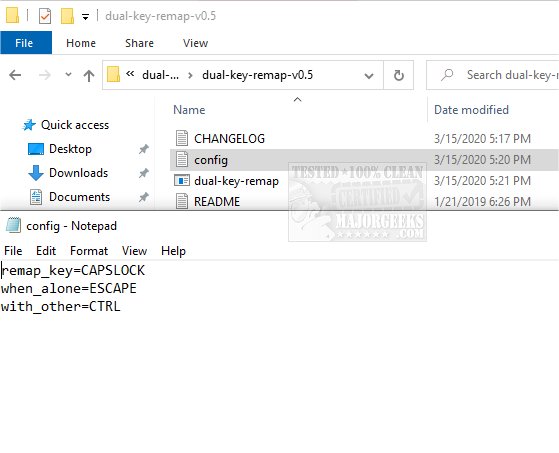
The recently released version 0.12 of Dual Key Remap is an innovative, portable, and Open Source application that provides users with the ability to remap any keyboard key to two different keys. This functionality is particularly beneficial for those who want to enhance their typing experience or address specific keyboard issues. A common use case for this tool is remapping the CapsLock key to function as the Escape key when pressed alone, and as the Ctrl key when pressed in combination with other keys.
This application can be crucial for users whose keyboards have malfunctioning keys. While external keyboards provide a workaround for desktop users, laptop users may find that a failing key can significantly impede their work, making tools like Dual Key Remap invaluable for project completion. The application allows users to view key mappings by their designated names, as detailed in the accompanying wiki.
It's important to note that exiting Dual Key Remap requires using the Task Manager to End Task, which will restore all keys to their original settings.
Key Features of Dual Key Remap:
- Efficiency: The app operates quickly with a minimal CPU footprint, ensuring that it does not hinder overall system performance.
- Input Handling: It effectively manages inputs without swallowing or leaking them, maintaining the integrity of user interactions.
- Edge Case Management: The application is designed to handle various edge cases, enhancing its reliability.
Related Tools and Tips:
- Users interested in optimizing their keyboard use may also explore related topics such as making the Scroll Lock key more useful, disabling the Insert key in Windows 10 & 11, and utilizing keyboard shortcuts to increase productivity.
In conclusion, Dual Key Remap 0.12 presents a powerful solution for users seeking customizable keyboard functionality and serves as a valuable tool for improving typing efficiency and addressing keyboard issues. As technology continues to evolve, applications like these will remain essential in catering to user needs
This application can be crucial for users whose keyboards have malfunctioning keys. While external keyboards provide a workaround for desktop users, laptop users may find that a failing key can significantly impede their work, making tools like Dual Key Remap invaluable for project completion. The application allows users to view key mappings by their designated names, as detailed in the accompanying wiki.
It's important to note that exiting Dual Key Remap requires using the Task Manager to End Task, which will restore all keys to their original settings.
Key Features of Dual Key Remap:
- Efficiency: The app operates quickly with a minimal CPU footprint, ensuring that it does not hinder overall system performance.
- Input Handling: It effectively manages inputs without swallowing or leaking them, maintaining the integrity of user interactions.
- Edge Case Management: The application is designed to handle various edge cases, enhancing its reliability.
Related Tools and Tips:
- Users interested in optimizing their keyboard use may also explore related topics such as making the Scroll Lock key more useful, disabling the Insert key in Windows 10 & 11, and utilizing keyboard shortcuts to increase productivity.
In conclusion, Dual Key Remap 0.12 presents a powerful solution for users seeking customizable keyboard functionality and serves as a valuable tool for improving typing efficiency and addressing keyboard issues. As technology continues to evolve, applications like these will remain essential in catering to user needs
Dual Key Remap 0.12 released
Dual Key Remap is a portable, Open Source app that allows the remapping of any key to any other two keys.