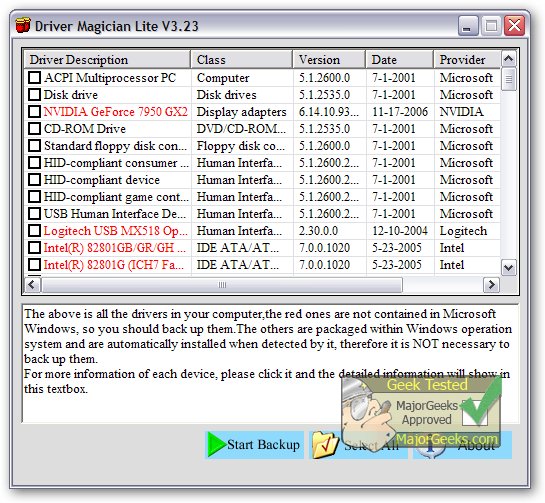
Driver Magician Lite 5.83 has been released, providing users with a comprehensive solution for managing device drivers. This software facilitates the backup, restoration, updating, and removal of drivers, ensuring that users can maintain optimal system performance.
The application identifies all hardware components in a system, extracts their corresponding drivers, and allows users to back them up to a specified location. This feature is particularly beneficial when reinstalling or upgrading an operating system, as users can restore their drivers seamlessly, mimicking the process of using original driver diskettes. A single system reboot after restoration ensures that the PC is fully equipped with the necessary hardware drivers.
Additionally, Driver Magician Lite includes a built-in database that connects to the internet for driver updates, significantly streamlining the process of finding and installing the correct drivers. Updated drivers can enhance hardware performance, making this tool essential for maintaining an efficient system.
The software features several functionalities:
- Backup device drivers through four different modes.
- One-click restoration of drivers from backups.
- Driver updates to enhance system stability and performance.
- Uninstallation of drivers when necessary.
- Live updates for both the device identifier database and the driver update database.
- Detection of unknown devices on the PC.
- Backup of additional items, including user documents and system registry settings.
- Restoration of these items from backups.
- Detailed information about hardware drivers.
- Capability to create an auto-setup package (.EXE) for driver restoration without needing to install Driver Magician.
Overall, Driver Magician Lite is a powerful tool for anyone looking to manage their device drivers efficiently and improve their computer's performance.
In addition to its core functions, users might find it valuable to explore resources on how to download the latest drivers for Windows, methods for backing up and restoring drivers, and tips for managing Windows updates to prevent automatic driver downloads on Windows 10 and 11. These complementary guides can further enhance the user experience and ensure a well-maintained system
The application identifies all hardware components in a system, extracts their corresponding drivers, and allows users to back them up to a specified location. This feature is particularly beneficial when reinstalling or upgrading an operating system, as users can restore their drivers seamlessly, mimicking the process of using original driver diskettes. A single system reboot after restoration ensures that the PC is fully equipped with the necessary hardware drivers.
Additionally, Driver Magician Lite includes a built-in database that connects to the internet for driver updates, significantly streamlining the process of finding and installing the correct drivers. Updated drivers can enhance hardware performance, making this tool essential for maintaining an efficient system.
The software features several functionalities:
- Backup device drivers through four different modes.
- One-click restoration of drivers from backups.
- Driver updates to enhance system stability and performance.
- Uninstallation of drivers when necessary.
- Live updates for both the device identifier database and the driver update database.
- Detection of unknown devices on the PC.
- Backup of additional items, including user documents and system registry settings.
- Restoration of these items from backups.
- Detailed information about hardware drivers.
- Capability to create an auto-setup package (.EXE) for driver restoration without needing to install Driver Magician.
Overall, Driver Magician Lite is a powerful tool for anyone looking to manage their device drivers efficiently and improve their computer's performance.
In addition to its core functions, users might find it valuable to explore resources on how to download the latest drivers for Windows, methods for backing up and restoring drivers, and tips for managing Windows updates to prevent automatic driver downloads on Windows 10 and 11. These complementary guides can further enhance the user experience and ensure a well-maintained system
Driver Magician Lite 5.83 released
Driver Magician Lite offers a professional solution for device driver's backup, restoration, update, and removal.