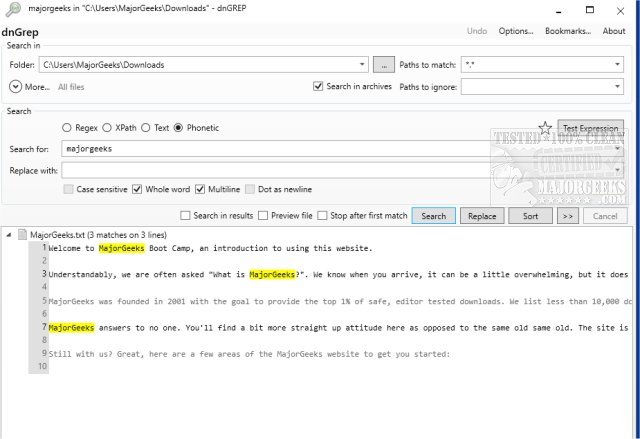
dnGrep 5.0.49.0 has been released, marking an update to this open-source Windows tool designed for efficient search and replace functionalities. Serving as a graphical user interface (GUI) for GREP, dnGrep allows users to effectively search through various types of documents, including text files, Word documents, PDFs, and archived files, using methods such as text searches, regular expressions, XPath, and phonetic queries.
The tool boasts a rich array of features, including search-and-replace capabilities complete with an undo option, a whole-file preview, and the ability to perform right-click searches directly from File Explorer. Additionally, users can manage search results by moving, copying, or deleting them, and they can open specific lines in custom editors like Notepad++. The user-friendly interface is designed to be intuitive for those familiar with GREP, and dnGrep can be utilized independently of GREP installation.
Though the last stable version prior to this release was in 2015, dnGrep has continued to evolve with multiple updates, enhancing its functionality and user experience. Key features include bookmarking search patterns for easy access later, a test window for experimenting with complex searches, and overall improvements in performance.
As dnGrep continues to develop, it remains a valuable tool for users needing advanced search capabilities across various document types, further solidifying its role in both casual and professional settings for text management and analysis.
Looking ahead, future updates could potentially introduce even more advanced features such as cloud integration for document searches, enhanced collaboration tools for team projects, or support for additional file formats. These enhancements could make dnGrep an even more versatile tool in the realm of document management and data extraction
The tool boasts a rich array of features, including search-and-replace capabilities complete with an undo option, a whole-file preview, and the ability to perform right-click searches directly from File Explorer. Additionally, users can manage search results by moving, copying, or deleting them, and they can open specific lines in custom editors like Notepad++. The user-friendly interface is designed to be intuitive for those familiar with GREP, and dnGrep can be utilized independently of GREP installation.
Though the last stable version prior to this release was in 2015, dnGrep has continued to evolve with multiple updates, enhancing its functionality and user experience. Key features include bookmarking search patterns for easy access later, a test window for experimenting with complex searches, and overall improvements in performance.
As dnGrep continues to develop, it remains a valuable tool for users needing advanced search capabilities across various document types, further solidifying its role in both casual and professional settings for text management and analysis.
Looking ahead, future updates could potentially introduce even more advanced features such as cloud integration for document searches, enhanced collaboration tools for team projects, or support for additional file formats. These enhancements could make dnGrep an even more versatile tool in the realm of document management and data extraction
dnGrep 5.0.49.0 released
dnGrep is an Open Source Windows search and replace tool capable of being used as a GUI for GREP.