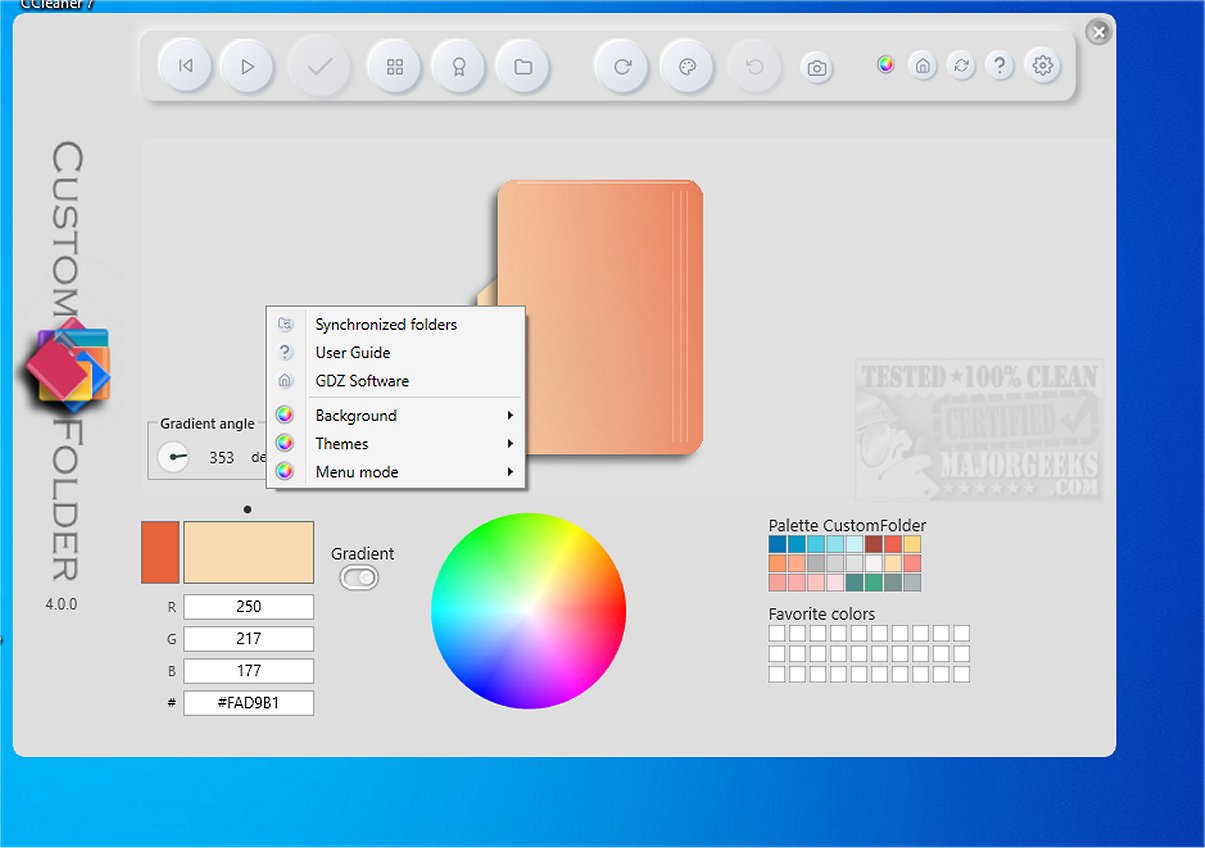
CustomFolder 4.0.1 has been launched, bringing exciting features that allow users to personalize their Windows folders with a variety of colors, icons, and emblems. This software not only offers an attractive interface but also includes a portable version for those who prefer flexibility.
To get started, users are encouraged to complete a tutorial that highlights the various features and options available within CustomFolder. Once familiarized, users can easily customize their folders to reflect their personal preferences. The application provides an extensive array of color choices and emblem collections, catering to diverse tastes.
One of the standout features of CustomFolder is its user-friendly functionality, allowing users to apply or switch between saved themes with just a click. Additionally, users can enhance their folders by uploading personal images, making the customization possibilities virtually limitless.
Key Features of CustomFolder:
- Create unique icons with customizable emblems.
- Choose from three pre-defined icons to color.
- Attach up to nine emblems per icon.
- Rotate icons based on selected templates.
- Add an unlimited number of personal icons.
- Use the Folder Panel to design multiple folders at once.
- Drag and drop folders or JPG images for easy customization.
- Over 60 emblems included for creative expression.
- Options for a floating emblem.
- Customizable color settings with access to 16.7 million colors and multiple palettes.
- 30 slots available for storing custom colors.
CustomFolder is an exceptional tool for anyone who frequently navigates through File Explorer, enabling quick identification and customization of folders.
In summary, CustomFolder 4.0.1 is not only a practical solution for folder organization but also an entertaining way to personalize one’s digital workspace. With its comprehensive features, this application is sure to appeal to users seeking a more vibrant and individualized experience in Windows.
For those interested in enhancing their Windows interface further, explore guides on adding color to the Start menu, taskbar, and more, as well as using emojis in Windows 10 and 11
To get started, users are encouraged to complete a tutorial that highlights the various features and options available within CustomFolder. Once familiarized, users can easily customize their folders to reflect their personal preferences. The application provides an extensive array of color choices and emblem collections, catering to diverse tastes.
One of the standout features of CustomFolder is its user-friendly functionality, allowing users to apply or switch between saved themes with just a click. Additionally, users can enhance their folders by uploading personal images, making the customization possibilities virtually limitless.
Key Features of CustomFolder:
- Create unique icons with customizable emblems.
- Choose from three pre-defined icons to color.
- Attach up to nine emblems per icon.
- Rotate icons based on selected templates.
- Add an unlimited number of personal icons.
- Use the Folder Panel to design multiple folders at once.
- Drag and drop folders or JPG images for easy customization.
- Over 60 emblems included for creative expression.
- Options for a floating emblem.
- Customizable color settings with access to 16.7 million colors and multiple palettes.
- 30 slots available for storing custom colors.
CustomFolder is an exceptional tool for anyone who frequently navigates through File Explorer, enabling quick identification and customization of folders.
In summary, CustomFolder 4.0.1 is not only a practical solution for folder organization but also an entertaining way to personalize one’s digital workspace. With its comprehensive features, this application is sure to appeal to users seeking a more vibrant and individualized experience in Windows.
For those interested in enhancing their Windows interface further, explore guides on adding color to the Start menu, taskbar, and more, as well as using emojis in Windows 10 and 11
CustomFolder 4.0.1 released
CustomFolder allows you to customize your Windows folders with different colors, icons, and emblems. A portable option is available.