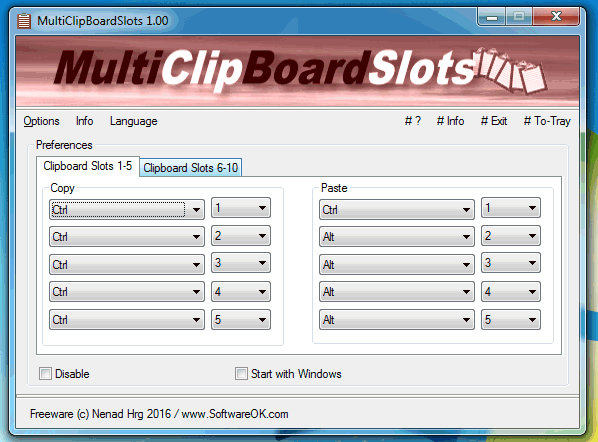
MultiClipBoardSlots 3.63 has been released, offering users an efficient and portable solution for managing clipboard content. This small program enhances the standard Clipboard functionality by providing up to 10 separate Clipboard Memory Slots, allowing users to store and access multiple items, including text and images, without the risk of overwriting existing clipboard data.
With MultiClipBoardSlots, users can easily switch between different clipboard entries using customizable Windows keyboard shortcuts, which are initially set but can be modified to suit individual preferences. The program is designed to be user-friendly, featuring both installation and uninstallation functions, and it supports multiple languages, enhancing accessibility for a diverse range of users.
Additional relevant features include its lightweight nature and portability, making it convenient for users who need clipboard management on the go. Users may find it helpful in various scenarios, such as when copying paths for files or folders, or when clearing clipboard history quickly using shortcuts.
In summary, MultiClipBoardSlots 3.63 is an invaluable tool for anyone looking to improve their clipboard management, offering flexibility and ease of use for both casual and professional tasks. As digital workflows continue to evolve, such tools become essential for enhancing productivity and efficiency
With MultiClipBoardSlots, users can easily switch between different clipboard entries using customizable Windows keyboard shortcuts, which are initially set but can be modified to suit individual preferences. The program is designed to be user-friendly, featuring both installation and uninstallation functions, and it supports multiple languages, enhancing accessibility for a diverse range of users.
Additional relevant features include its lightweight nature and portability, making it convenient for users who need clipboard management on the go. Users may find it helpful in various scenarios, such as when copying paths for files or folders, or when clearing clipboard history quickly using shortcuts.
In summary, MultiClipBoardSlots 3.63 is an invaluable tool for anyone looking to improve their clipboard management, offering flexibility and ease of use for both casual and professional tasks. As digital workflows continue to evolve, such tools become essential for enhancing productivity and efficiency
MultiClipBoardSlots 3.63 released
MultiClipBoardSlots is a small portable program that allows you to extend the Clipboard for up to 10 Clipboard Memory Slots.