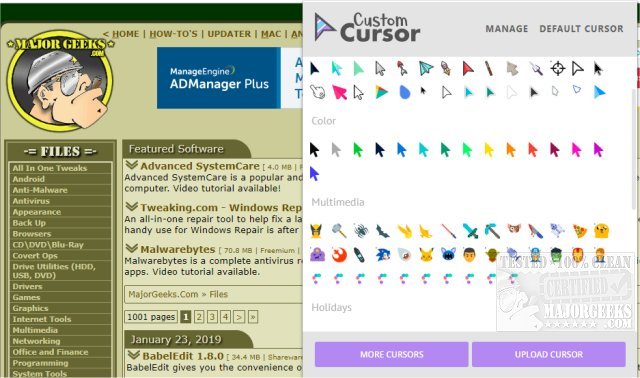
Custom Cursor version 3.7.8 / 1.0.25 has been released for Windows and Google Chrome. This extension offers users a vast selection of free cursors and the option to upload custom ones, allowing for a personalized browsing experience. After installing the extension, users must refresh any previously opened pages for the new cursors to take effect.
Activating a chosen cursor is straightforward: simply open the extension and select a cursor from the available options. Users can also upload their own designs if they prefer something unique. The collection boasts over 100 different cursors categorized by themes, including popular choices like Minecraft, Lightsabers, and Pizza, as well as many other amusing designs.
In addition to the core functionality of Custom Cursor, users may find related topics helpful, such as troubleshooting issues with mouse cursor movement, activating windows by hovering, enabling mouse pointer trails, and managing pointer settings in Windows.
To enhance the user experience further, future updates could introduce features like customizable cursor sizes, animated cursors, or the ability to create and save cursor sets for different browsing scenarios. Additionally, integrating community features where users can share and rate custom cursors could foster a more interactive environment, encouraging creativity and collaboration among users
Activating a chosen cursor is straightforward: simply open the extension and select a cursor from the available options. Users can also upload their own designs if they prefer something unique. The collection boasts over 100 different cursors categorized by themes, including popular choices like Minecraft, Lightsabers, and Pizza, as well as many other amusing designs.
In addition to the core functionality of Custom Cursor, users may find related topics helpful, such as troubleshooting issues with mouse cursor movement, activating windows by hovering, enabling mouse pointer trails, and managing pointer settings in Windows.
To enhance the user experience further, future updates could introduce features like customizable cursor sizes, animated cursors, or the ability to create and save cursor sets for different browsing scenarios. Additionally, integrating community features where users can share and rate custom cursors could foster a more interactive environment, encouraging creativity and collaboration among users
Custom Cursor 3.7.8 / 1.0.25 released
Custom Cursor for Windows and Google Chrome provides you with a large collection of free cursors, or you can upload your own.