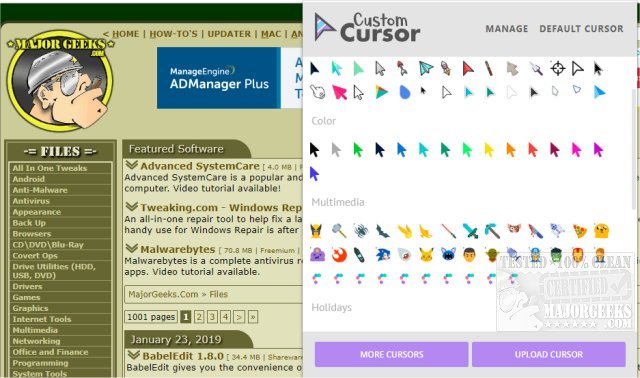
The Custom Cursor extension, updated to version 3.7.5 / 1.0.25, is now available for both Windows and Google Chrome users. This tool allows users to personalize their browsing experience by choosing from a vast library of free cursor designs or uploading their own custom cursors. With an extensive collection exceeding 100 unique cursors, users can find options that cater to various interests, including themes like Minecraft, lightsabers, and pizza, among many others.
To utilize the extension, users need to refresh any previously opened pages after installation. Activating a cursor is straightforward: simply open the extension and select a cursor, or upload a preferred design using the provided button. This addition to Chrome not only enhances individual browsing styles but also adds an element of fun.
In addition to the Custom Cursor extension, users may find the following related topics useful:
- Solutions for fixing erratic mouse cursor movements while typing.
- Methods to activate a window by hovering the mouse over it.
- Instructions for enabling mouse pointer trails for better visibility.
- Tips on enabling or disabling the snap pointer to default button feature in Windows.
Overall, Custom Cursor is an easy-to-use extension that enriches the web browsing experience with customization options, making it appealing to users looking to add a personal touch to their online activities
To utilize the extension, users need to refresh any previously opened pages after installation. Activating a cursor is straightforward: simply open the extension and select a cursor, or upload a preferred design using the provided button. This addition to Chrome not only enhances individual browsing styles but also adds an element of fun.
In addition to the Custom Cursor extension, users may find the following related topics useful:
- Solutions for fixing erratic mouse cursor movements while typing.
- Methods to activate a window by hovering the mouse over it.
- Instructions for enabling mouse pointer trails for better visibility.
- Tips on enabling or disabling the snap pointer to default button feature in Windows.
Overall, Custom Cursor is an easy-to-use extension that enriches the web browsing experience with customization options, making it appealing to users looking to add a personal touch to their online activities
Custom Cursor 3.7.5 / 1.0.25 released
Custom Cursor for Windows and Google Chrome provides you with a large collection of free cursors, or you can upload your own.