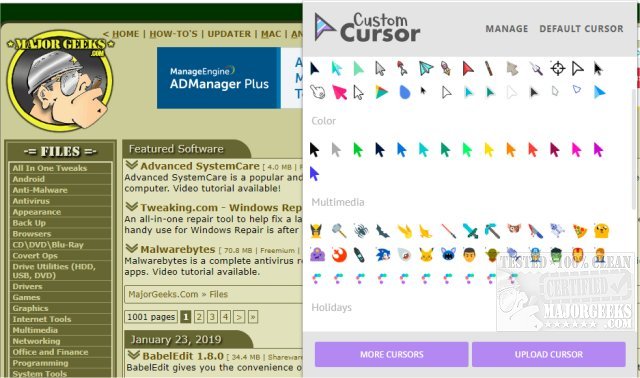
Custom Cursor version 3.7.1 / 1.0.25 has been released, enhancing the experience for users on Windows and Google Chrome. This extension offers a vast collection of free cursors, allowing users to personalize their browsing experience by either selecting from the extensive library or uploading their own custom designs. With over 100 different cursors available, users can choose from various categories, including popular themes like Minecraft, Lightsaber, and Pizza, among others.
To utilize the Custom Cursor, users need to refresh any previously opened pages after installing the extension. The activation of a chosen cursor is straightforward—simply open the extension and click on the desired pointer. Alternatively, users have the option to upload their own cursor by selecting the upload button.
This tool not only adds a fun element to web browsing but also allows for a degree of personalization that many users appreciate. Additionally, the extension may be particularly appealing to those who enjoy customizing their digital environments or looking for a playful way to enhance their online interactions.
In addition to Custom Cursor, users may also find helpful guides related to cursor issues, such as troubleshooting a jumping mouse cursor, activating windows by hovering, enabling mouse pointer trails, and adjusting pointer settings in Windows. These resources can further improve the overall user experience while navigating on their devices.
As technology continues to evolve, tools like Custom Cursor exemplify how simple extensions can significantly enhance user engagement and satisfaction in digital spaces
To utilize the Custom Cursor, users need to refresh any previously opened pages after installing the extension. The activation of a chosen cursor is straightforward—simply open the extension and click on the desired pointer. Alternatively, users have the option to upload their own cursor by selecting the upload button.
This tool not only adds a fun element to web browsing but also allows for a degree of personalization that many users appreciate. Additionally, the extension may be particularly appealing to those who enjoy customizing their digital environments or looking for a playful way to enhance their online interactions.
In addition to Custom Cursor, users may also find helpful guides related to cursor issues, such as troubleshooting a jumping mouse cursor, activating windows by hovering, enabling mouse pointer trails, and adjusting pointer settings in Windows. These resources can further improve the overall user experience while navigating on their devices.
As technology continues to evolve, tools like Custom Cursor exemplify how simple extensions can significantly enhance user engagement and satisfaction in digital spaces
Custom Cursor 3.7.1 / 1.0.25 released
Custom Cursor for Windows and Google Chrome provides you with a large collection of free cursors, or you can upload your own.