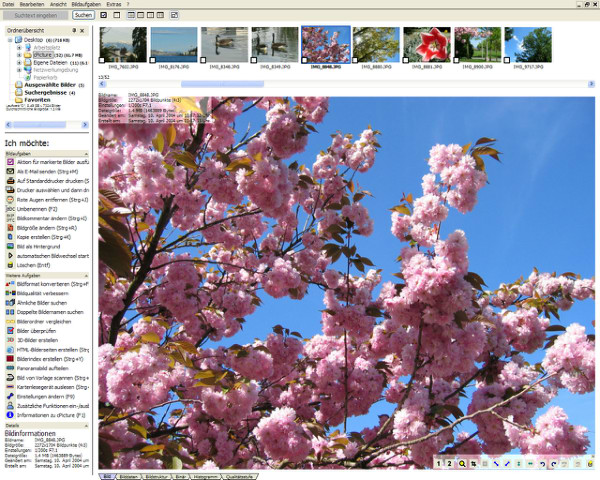
cPicture LE 4.13 has been released as a comprehensive software solution designed to streamline your digital picture workflow. It is user-friendly, requiring no database setup or installation, making it accessible for users of all levels. The software stands out as a leading choice for lossless cropping of JPEG images, ensuring high-quality edits without compromising the original files.
With features like universal index prints for easy review, rapid searching capabilities, and the ability to add comments or simply browse through your collection, cPicture enhances the overall experience of managing digital photos. Users can also enjoy watching their movies in a 16:9 aspect ratio. To get started, users can simply copy the latest version of the application, making the setup process straightforward.
In addition to its core functionalities, cPicture LE 4.13 does not require any additional picture or Raw libraries, which means it won't conflict with other programs already installed on your device.
For those looking for more support with digital image management, related guides are available, such as restoring the Windows Photo Viewer, managing folder settings in the Photos app, and disabling certain notifications in Windows 10 and 11.
As digital photography continues to evolve, software like cPicture LE 4.13 is essential for ensuring efficient and effective management of images, allowing photographers to focus more on their creativity rather than technical hurdles. Future updates may introduce enhanced features like AI-assisted editing tools, cloud integration for seamless storage solutions, and improved collaboration options for sharing and working on images with others
With features like universal index prints for easy review, rapid searching capabilities, and the ability to add comments or simply browse through your collection, cPicture enhances the overall experience of managing digital photos. Users can also enjoy watching their movies in a 16:9 aspect ratio. To get started, users can simply copy the latest version of the application, making the setup process straightforward.
In addition to its core functionalities, cPicture LE 4.13 does not require any additional picture or Raw libraries, which means it won't conflict with other programs already installed on your device.
For those looking for more support with digital image management, related guides are available, such as restoring the Windows Photo Viewer, managing folder settings in the Photos app, and disabling certain notifications in Windows 10 and 11.
As digital photography continues to evolve, software like cPicture LE 4.13 is essential for ensuring efficient and effective management of images, allowing photographers to focus more on their creativity rather than technical hurdles. Future updates may introduce enhanced features like AI-assisted editing tools, cloud integration for seamless storage solutions, and improved collaboration options for sharing and working on images with others
cPicture LE 4.13 released
cPicture is a modern all-in-one software suite to support your digital picture workflow. Very easy and without a database or installation.