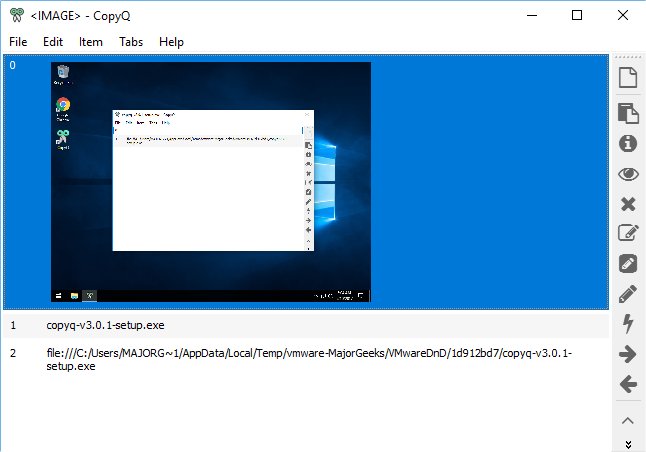
CopyQ is an advanced open-source clipboard manager designed to enhance clipboard functionality with features such as a searchable and editable history, support for various image formats, and command-line control. The latest version, CopyQ 17.0.0, introduces several enhancements and user-friendly options during installation, allowing users to choose from a variety of plugins that enhance its core capabilities, including highlighting, note-taking, encryption, and more.
One notable aspect of CopyQ is its unobtrusive presence, as it runs in the system tray and activates only when needed. Users can effortlessly copy all types of content, including text, links, and images, and easily access these items through a sleek interface that offers various actions such as content preview, deletion, and editing. The editing tools available for clipboard items are comprehensive, allowing users to modify text with different fonts, styles, and formatting options.
While the interface is generally intuitive, users may encounter minor quirks during navigation, such as difficulty returning to the main menu after opening an item or experiencing an empty window after deleting an item. These issues are not significant enough to detract from the overall functionality but may require some adjustment by users.
Unlike the standard clipboard, which retains only the most recent item copied, CopyQ provides a robust solution by continuously monitoring and storing all clipboard entries, offering users unprecedented access to their clipboard history.
Future Extensions and Enhancements
As CopyQ continues to evolve, potential future enhancements could include:
1. Plugin Management: Introducing a more intuitive method for adding or removing plugins after initial installation, allowing users to customize their experience without needing to reinstall the software.
2. User Interface Improvements: Streamlining navigation with clearer icons or shortcuts that facilitate easy access to previously opened items, thus reducing user frustration.
3. Enhanced Search Functionality: Implementing advanced search options that allow users to filter clipboard items by type, date, or tags, making it easier to locate specific entries.
4. Cross-Device Synchronization: Developing a feature that allows users to sync their clipboard history across multiple devices, ensuring their clipboard data is accessible anywhere.
5. Integration with Other Applications: Expanding compatibility with popular productivity tools and applications to streamline workflows and enhance productivity.
Overall, CopyQ 17.0.0 stands out as a powerful tool for anyone looking to optimize their clipboard management, and with ongoing improvements, it has the potential to become an indispensable resource for users seeking efficient data handling solutions
One notable aspect of CopyQ is its unobtrusive presence, as it runs in the system tray and activates only when needed. Users can effortlessly copy all types of content, including text, links, and images, and easily access these items through a sleek interface that offers various actions such as content preview, deletion, and editing. The editing tools available for clipboard items are comprehensive, allowing users to modify text with different fonts, styles, and formatting options.
While the interface is generally intuitive, users may encounter minor quirks during navigation, such as difficulty returning to the main menu after opening an item or experiencing an empty window after deleting an item. These issues are not significant enough to detract from the overall functionality but may require some adjustment by users.
Unlike the standard clipboard, which retains only the most recent item copied, CopyQ provides a robust solution by continuously monitoring and storing all clipboard entries, offering users unprecedented access to their clipboard history.
Future Extensions and Enhancements
As CopyQ continues to evolve, potential future enhancements could include:
1. Plugin Management: Introducing a more intuitive method for adding or removing plugins after initial installation, allowing users to customize their experience without needing to reinstall the software.
2. User Interface Improvements: Streamlining navigation with clearer icons or shortcuts that facilitate easy access to previously opened items, thus reducing user frustration.
3. Enhanced Search Functionality: Implementing advanced search options that allow users to filter clipboard items by type, date, or tags, making it easier to locate specific entries.
4. Cross-Device Synchronization: Developing a feature that allows users to sync their clipboard history across multiple devices, ensuring their clipboard data is accessible anywhere.
5. Integration with Other Applications: Expanding compatibility with popular productivity tools and applications to streamline workflows and enhance productivity.
Overall, CopyQ 17.0.0 stands out as a powerful tool for anyone looking to optimize their clipboard management, and with ongoing improvements, it has the potential to become an indispensable resource for users seeking efficient data handling solutions
CopyQ 17.0.0 released
CopyQ is an Open Source clipboard manager with searchable and editable history plus support for image formats, command-line control and more.