Coodesker version 1.1.0.5 has been released, offering users an innovative way to manage their desktop items by organizing them into neat boxes. This application allows users to either manually place items within designated boxes or utilize the Organize Desktop feature, which automatically sorts and arranges items for optimal organization. Once items are contained, users have the flexibility to adjust the size of the boxes, name them, or disband them to revert to a traditional desktop layout.
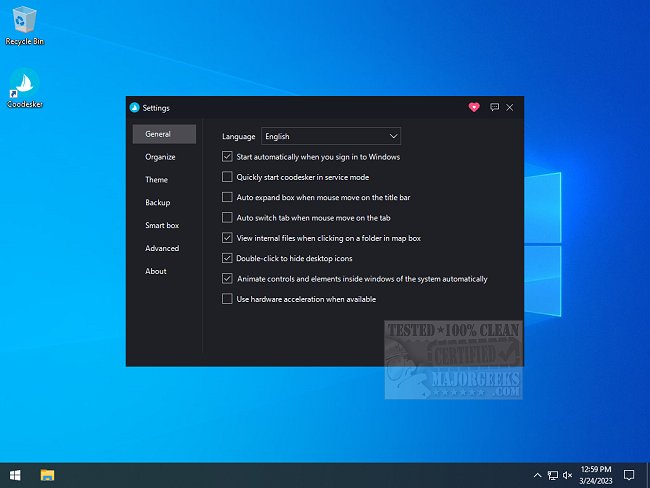
The settings interface is user-friendly and provides a range of options, including starting the application with Windows, running in service mode, and enabling hardware acceleration. Each box can be customized in size and theme, with the option to add background images for a personalized look. Additionally, users can back up their preferred layouts to ensure their organizational setups are preserved.
For those overwhelmed by cluttered desktops, Coodesker presents a valuable solution. A comprehensive usage guide is available on the developer's website to help users navigate the features effectively.
In addition to these features, future updates could include integrations with cloud storage services for seamless access to desktop items across multiple devices, enhanced customization options such as animated backgrounds, and improved sorting algorithms to better categorize items based on user preferences. Furthermore, the addition of collaborative features could allow multiple users to share and organize desktop items collectively, making it a versatile tool for teams and households alike
The settings interface is user-friendly and provides a range of options, including starting the application with Windows, running in service mode, and enabling hardware acceleration. Each box can be customized in size and theme, with the option to add background images for a personalized look. Additionally, users can back up their preferred layouts to ensure their organizational setups are preserved.
For those overwhelmed by cluttered desktops, Coodesker presents a valuable solution. A comprehensive usage guide is available on the developer's website to help users navigate the features effectively.
In addition to these features, future updates could include integrations with cloud storage services for seamless access to desktop items across multiple devices, enhanced customization options such as animated backgrounds, and improved sorting algorithms to better categorize items based on user preferences. Furthermore, the addition of collaborative features could allow multiple users to share and organize desktop items collectively, making it a versatile tool for teams and households alike
Coodesker 1.1.0.5 released
Coodesker lets you organize all your desktop items into neat boxes.