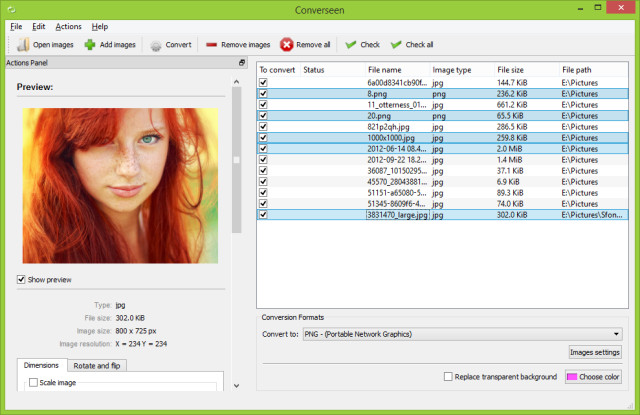
Converseen 0.15.2.5-2 has been released, enhancing its reputation as a robust and free cross-platform batch image processing tool. This software enables users to manage and manipulate multiple images with a single click, which is especially beneficial for those handling extensive image collections.
Key Features of Converseen:
- Versatile Format Support: Converseen can convert entire PDF files into various image formats, supporting over 100 different types, including popular formats like DPX, EXR, GIF, JPEG, JPEG-2000, PNG, SVG, TIFF, WebP, and HEIC/HEIF. This makes it a valuable asset for both personal and professional projects.
- User-Friendly Interface: The software is designed with ease of use in mind, featuring an intuitive interface that simplifies navigation. This approach allows both tech-savvy individuals and novices to use the tool effectively without a steep learning curve.
- Efficient Processing: Converseen boasts rapid processing speeds, making it ideal for professionals seeking to enhance their workflow efficiency, as well as casual users needing quick image conversions.
- Quality Preservation: The tool ensures exceptional image quality, maintaining the integrity of original files even while performing tasks such as resizing, rotating, flipping, and renaming.
Converseen is available in a 32-bit version, making it accessible to a wider range of systems. As a completely free resource, it stands out as an essential tool for anyone looking to improve their image processing capabilities without incurring costs.
In summary, Converseen is not only a practical solution for batch image processing but also an indispensable tool for anyone involved in digital image management. Its combination of features, user-friendly design, and cost-effectiveness makes it a top choice for enhancing image workflows. Experience the ease and efficiency of Converseen today and take your image processing tasks to the next level
Key Features of Converseen:
- Versatile Format Support: Converseen can convert entire PDF files into various image formats, supporting over 100 different types, including popular formats like DPX, EXR, GIF, JPEG, JPEG-2000, PNG, SVG, TIFF, WebP, and HEIC/HEIF. This makes it a valuable asset for both personal and professional projects.
- User-Friendly Interface: The software is designed with ease of use in mind, featuring an intuitive interface that simplifies navigation. This approach allows both tech-savvy individuals and novices to use the tool effectively without a steep learning curve.
- Efficient Processing: Converseen boasts rapid processing speeds, making it ideal for professionals seeking to enhance their workflow efficiency, as well as casual users needing quick image conversions.
- Quality Preservation: The tool ensures exceptional image quality, maintaining the integrity of original files even while performing tasks such as resizing, rotating, flipping, and renaming.
Converseen is available in a 32-bit version, making it accessible to a wider range of systems. As a completely free resource, it stands out as an essential tool for anyone looking to improve their image processing capabilities without incurring costs.
In summary, Converseen is not only a practical solution for batch image processing but also an indispensable tool for anyone involved in digital image management. Its combination of features, user-friendly design, and cost-effectiveness makes it a top choice for enhancing image workflows. Experience the ease and efficiency of Converseen today and take your image processing tasks to the next level
Converseen 0.15.2.5-2 released
Converseen is a powerful and free, cross-platform batch image processing tool that allows users to efficiently manage and manipulate multiple images simultaneously with just a single click. 32-bit is also available.