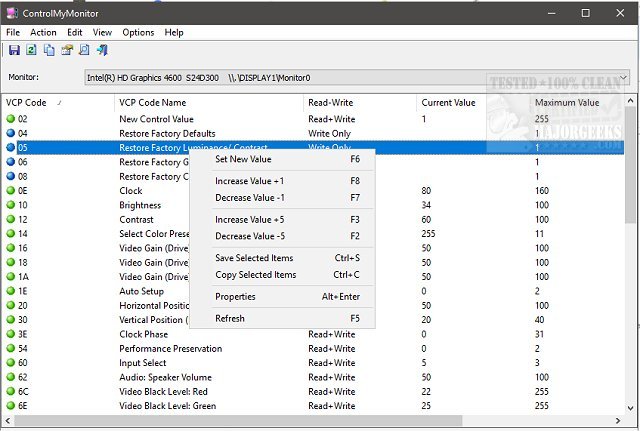
ControlMyMonitor version 1.41 has been released, offering users a powerful yet user-friendly freeware utility designed to manage their monitor's display settings. This tool enables easy access to various Virtual Control Panel (VCP) settings, such as brightness, contrast, sharpness, and the red, green, and blue color balance.
Users can choose to modify their monitor settings via a graphical user interface (GUI) or command line, catering to different user preferences. For those managing multiple monitors, ControlMyMonitor conveniently displays them in a drop-down menu within the main window, facilitating effortless navigation.
The GUI is particularly intuitive; users can change settings simply by selecting an attribute and either pressing F6 or double-clicking it to access the modification menu. Additionally, ControlMyMonitor integrates into the right-click context menu, enhancing accessibility.
One of its standout features is the ability to export monitor settings to a configuration file, making it easy to switch between different settings profiles, such as those for gaming or general desktop use.
In summary, ControlMyMonitor 1.41 is a versatile tool for users seeking to optimize their display settings, whether for productivity or entertainment purposes. Its ease of use and multi-monitor support make it a valuable addition to anyone looking to enhance their visual experience.
For further exploration, users may also want to look into related topics such as adjusting DPI scaling levels in Windows 10 and 11 or turning off monitors on demand
Users can choose to modify their monitor settings via a graphical user interface (GUI) or command line, catering to different user preferences. For those managing multiple monitors, ControlMyMonitor conveniently displays them in a drop-down menu within the main window, facilitating effortless navigation.
The GUI is particularly intuitive; users can change settings simply by selecting an attribute and either pressing F6 or double-clicking it to access the modification menu. Additionally, ControlMyMonitor integrates into the right-click context menu, enhancing accessibility.
One of its standout features is the ability to export monitor settings to a configuration file, making it easy to switch between different settings profiles, such as those for gaming or general desktop use.
In summary, ControlMyMonitor 1.41 is a versatile tool for users seeking to optimize their display settings, whether for productivity or entertainment purposes. Its ease of use and multi-monitor support make it a valuable addition to anyone looking to enhance their visual experience.
For further exploration, users may also want to look into related topics such as adjusting DPI scaling levels in Windows 10 and 11 or turning off monitors on demand
ControlMyMonitor 1.41 released
ControlMyMonitor is a freeware monitor utility that provides a simple way to view and modify your monitor's display settings.