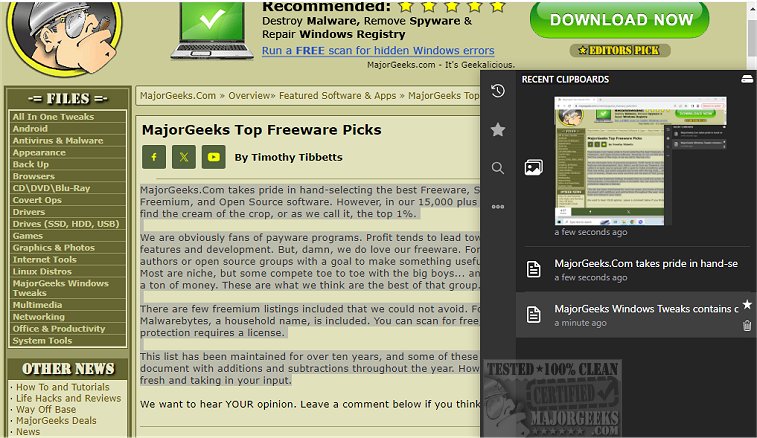
Clippy version 1.6.29 has been released, offering a dedicated clipboard manager that serves as a robust alternative to the default clipboard manager in Windows. This application is specifically designed to keep meticulous records of all copied text and images, allowing users to search through their clipboard history effortlessly. With a simple hotkey, users can access the clipboard manager near the system tray, making it easy to retrieve important copied items.
Clippy records every copy event, storing the information locally to prioritize user privacy. Alongside tracking text and images, it allows users to mark essential clipboard entries as favorites for quicker access. The application is highly customizable, enabling users to set their own hotkeys for swift navigation through recent and starred clipboard items, as well as their overall clipboard history. Additionally, Clippy offers cloud backup options, allowing synchronization of clipboard history with a cloud provider directly within the app.
Key features of Clippy include:
- Toggle display/hide options (ctrl+y or ctrl+d)
- Ability to type out clipboard contents (ctrl+b) in restricted areas
- Support for both images and text
- Custom keybindings
- Option to add favorite clipboard entries
- Smart search capabilities for links, colors, images, and hex codes
- Instant search functionality
- Ability to change the database location and keyboard bindings
- Dark mode and light mode options
In summary, Clippy is a user-friendly and feature-rich tool that significantly enhances clipboard management for anyone looking to improve their productivity.
Looking ahead, future updates could further enhance Clippy's capabilities by introducing collaborative features that allow multiple users to share and manage clipboard entries in real-time, or by integrating AI-powered suggestions for frequently copied items. The potential for additional themes and customizable layouts could also provide users with greater personalization options, making Clippy an even more valuable asset in daily workflows
Clippy records every copy event, storing the information locally to prioritize user privacy. Alongside tracking text and images, it allows users to mark essential clipboard entries as favorites for quicker access. The application is highly customizable, enabling users to set their own hotkeys for swift navigation through recent and starred clipboard items, as well as their overall clipboard history. Additionally, Clippy offers cloud backup options, allowing synchronization of clipboard history with a cloud provider directly within the app.
Key features of Clippy include:
- Toggle display/hide options (ctrl+y or ctrl+d)
- Ability to type out clipboard contents (ctrl+b) in restricted areas
- Support for both images and text
- Custom keybindings
- Option to add favorite clipboard entries
- Smart search capabilities for links, colors, images, and hex codes
- Instant search functionality
- Ability to change the database location and keyboard bindings
- Dark mode and light mode options
In summary, Clippy is a user-friendly and feature-rich tool that significantly enhances clipboard management for anyone looking to improve their productivity.
Looking ahead, future updates could further enhance Clippy's capabilities by introducing collaborative features that allow multiple users to share and manage clipboard entries in real-time, or by integrating AI-powered suggestions for frequently copied items. The potential for additional themes and customizable layouts could also provide users with greater personalization options, making Clippy an even more valuable asset in daily workflows
clippy 1.6.29 released
clippy provides a dedicated clipboard manager, a solid alternative to the default Windows manager.