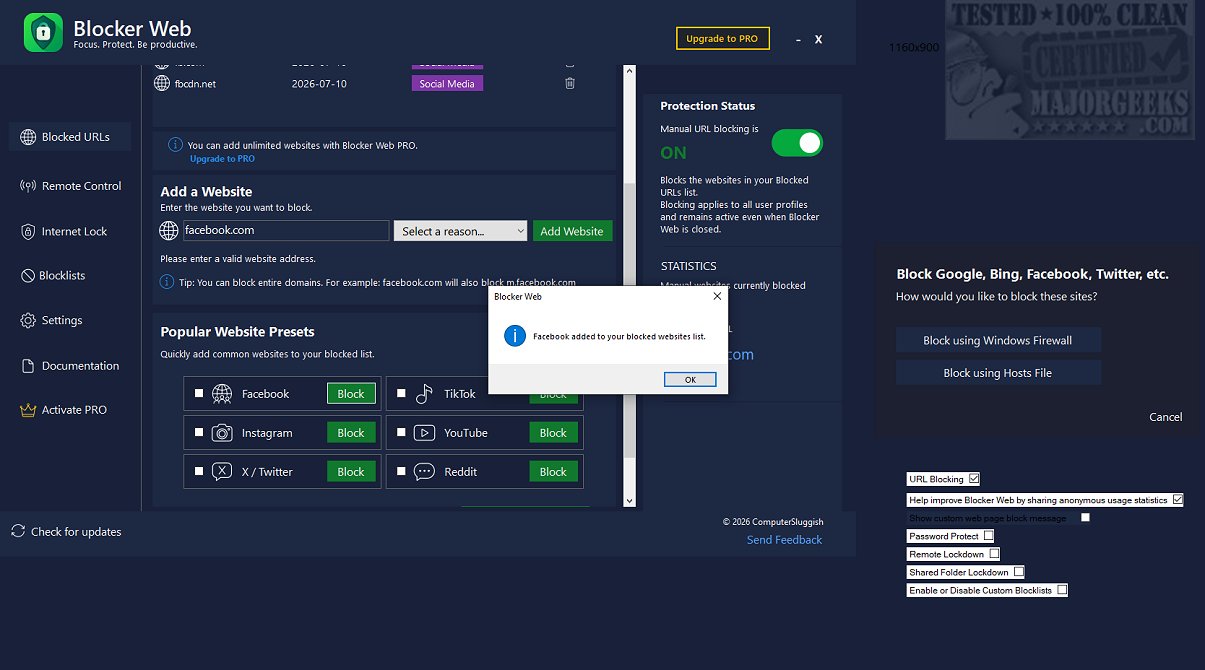
Blocker Web is a powerful application specifically designed for Windows PCs that aims to help users minimize distractions by blocking access to certain websites that often divert attention. This latest version, 1.1.5.0, introduces several features that enhance the user experience and effectiveness of the tool.
Key Features of Blocker Web:
1. Customizable Blocking: Users can block up to five specific websites simultaneously, allowing for tailored control over distractions. This feature is particularly beneficial for those who wish to maintain concentration on their tasks without the temptation of social media, streaming services, or news websites.
2. Intuitive User Interface: Blocker Web is designed with user-friendliness in mind. Its straightforward interface enables easy navigation and personalization of settings, making it accessible even for those who may not be tech-savvy.
3. Efficient Block List Management: The application includes a user-friendly management system that allows for quick updates to the list of blocked URLs. This flexibility ensures users can adapt their blocking preferences as their needs change.
4. Persistent Blocking: One of the standout features of Blocker Web is its ability to enforce website restrictions even when the app is not actively running. This ensures uninterrupted focus during work or study sessions.
5. Password Protection: For parents or individuals needing to maintain a distraction-free environment, Blocker Web offers an option to password-protect the block list, making it ideal for children during homework time.
6. System Modifications: Blocker Web modifies the Windows hosts file and firewall settings to effectively block websites. Users should be aware that administrator privileges may be required, and the app will back up the hosts file to allow for easy restoration if needed.
Conclusion: A Tool for Enhanced Productivity
Blocker Web stands out as an essential tool for anyone looking to improve their focus and productivity by eliminating online distractions. By simplifying the process of blocking unwanted content, users can better immerse themselves in their work, ultimately achieving their goals more efficiently. Whether you are tackling demanding projects, studying for exams, or trying to cultivate healthier browsing habits, Blocker Web provides a robust solution to help you stay on task. With its latest enhancements, it has become an invaluable resource for anyone seeking to navigate the challenges of a distraction-filled digital landscape
Key Features of Blocker Web:
1. Customizable Blocking: Users can block up to five specific websites simultaneously, allowing for tailored control over distractions. This feature is particularly beneficial for those who wish to maintain concentration on their tasks without the temptation of social media, streaming services, or news websites.
2. Intuitive User Interface: Blocker Web is designed with user-friendliness in mind. Its straightforward interface enables easy navigation and personalization of settings, making it accessible even for those who may not be tech-savvy.
3. Efficient Block List Management: The application includes a user-friendly management system that allows for quick updates to the list of blocked URLs. This flexibility ensures users can adapt their blocking preferences as their needs change.
4. Persistent Blocking: One of the standout features of Blocker Web is its ability to enforce website restrictions even when the app is not actively running. This ensures uninterrupted focus during work or study sessions.
5. Password Protection: For parents or individuals needing to maintain a distraction-free environment, Blocker Web offers an option to password-protect the block list, making it ideal for children during homework time.
6. System Modifications: Blocker Web modifies the Windows hosts file and firewall settings to effectively block websites. Users should be aware that administrator privileges may be required, and the app will back up the hosts file to allow for easy restoration if needed.
Conclusion: A Tool for Enhanced Productivity
Blocker Web stands out as an essential tool for anyone looking to improve their focus and productivity by eliminating online distractions. By simplifying the process of blocking unwanted content, users can better immerse themselves in their work, ultimately achieving their goals more efficiently. Whether you are tackling demanding projects, studying for exams, or trying to cultivate healthier browsing habits, Blocker Web provides a robust solution to help you stay on task. With its latest enhancements, it has become an invaluable resource for anyone seeking to navigate the challenges of a distraction-filled digital landscape
Blocker Web 1.1.5.0 released
Blocker Web is an effective application designed specifically for Windows PCs, aimed at helping you drastically reduce distractions by blocking access to specific websites that can divert attention.